








Direct Answer
IT operations management (ITOM) is the operational layer of IT that keeps devices, networks, software, and cloud services running reliably day to day: asset management, patching, software deployment, monitoring, and support. ITOM is no longer a topic only large companies with their own ops team can tackle: the six core functions can be rolled out through an all-in-one platform in days to a few weeks, instead of spending months setting up an enterprise tool, regardless of whether you already have an IT team or not.
Key Takeaways
- What is ITOM? ITOM makes sure the technology keeps running, for example by applying updates automatically instead of someone checking every device individually. ITSM, by contrast, just governs how requests about it get handled.
- Target audience: ITOM becomes relevant as soon as a company outgrows manual processes and spreadsheets, regardless of whether an in-house IT department already exists.
- Implementation reality: ITOM suites often need a dedicated project team and a lot of lead time; an all-in-one platform delivers the same core functions in far less time.
- The deeploi solution: as an all-in-one IT management platform, deeploi covers every ITOM core function, including expert support, without anyone in-house having to configure tools.
What is IT operations management (ITOM)?
ITOM describes the operational layer of IT: the ongoing management of hardware, networks, software, and cloud services so that day-to-day digital work runs smoothly. That includes things like automatically applying security updates, monitoring servers, or centrally deploying software – all the tasks that run in the background and usually only get noticed when they stop working.
There's no single, globally uniform standard for ITOM, since industry sources draw the boundaries slightly differently. In practice, ITOM covers the full set of operational measures that keep an IT infrastructure reliable, secure, and up to date.
ITOM vs. ITSM: where does one end and the other begin?
ITSM is the overarching framework for how IT services get delivered to employees, from ticket handling to change management to problem management.
ITOM is the operational layer underneath: keeping infrastructure, devices, and networks running day to day. Under ITIL, a widely used framework for IT service management, ITOM falls under the service operation phase of that lifecycle.
For everyday practice, a simple rule of thumb usually covers it: ITOM makes sure the technology runs, ITSM makes sure requests about it get handled in an orderly way.
Many smaller companies don't need to draw this distinction strictly at an organizational level at all – it's enough that both areas are covered reliably.
The six core functions of ITOM
ITOM breaks down into six clearly distinct functional areas. Each covers its own part of IT operations, and together they form a complete picture.
Mobile device management (MDM), managing smartphones and laptops, is a central building block of asset management here. Whoever covers all six functions has IT operations under control in the true sense, regardless of which tool does it. As an all-in-one IT management platform, deeploi covers all six functions from a single source, so companies don't have to piece them together from separate tools.
From what point does a company need ITOM, even without its own IT team?
ITOM doesn't become relevant only past a certain company size – it becomes relevant the moment manual processes and spreadsheets can no longer keep up. Typically, that happens at around 30 employees: devices get set up one by one, software licenses keep running unnoticed, and nobody has a full overview anymore of who has access to what.
Common symptoms include growing friction during onboarding, undetected shadow IT, missed security updates, and uncertainty about which access is still active.
That applies equally to two different starting points:
- Companies with no in-house IT department at all, where IT gets managed on the side by HR or leadership.
- Companies with a small IT team that's so tied up with routine requests like password resets that there's no time left for strategic projects.
The implementation reality check: enterprise tools vs. all-in-one platform
Three paths lead to the goal: build it yourself, combine individual tools, or use an already-integrated platform.
The difference with an all-in-one platform like deeploi: setup, ongoing operations, and support all come from one place, so there's no need to build a separate admin team or stitch individual tools together after the fact. That doesn't just shorten rollout time, it also reduces the ongoing risk of responsibilities getting lost between multiple tools and vendors.
How deeploi covers the six ITOM functions
As an all-in-one IT management platform, deeploi covers the ITOM functions without anyone in-house having to configure tools or manually escalate tickets.
IT asset management: device management (MDM) handles central inventory tracking along with zero-touch provisioning: new laptops and smartphones are shipped preconfigured directly to employees, with no one having to set them up manually. Every device, license, and area of responsibility is visible at a glance at all times, which prevents undetected shadow IT from the start.
Patch management: security updates for the operating system and installed programs are applied automatically in the background, with no one having to check every device individually. This closes security gaps continuously, rather than discovering them only after an incident.
Software deployment: software is distributed and updated centrally and automatically across all devices, so rollouts don't require on-site visits or individual installations. deeploi integrates directly with HR systems like Personio and other HRIS tools, so devices and access are ready automatically as soon as a new contract is signed, and new employees get ready-to-use devices with all approved apps from day one.
Monitoring & event management: security standards are enforced continuously rather than just checked periodically. Encryption, password policies, admin rights, and automatic updates are applied across all devices and kept permanently active. If a device drifts from its target state, that's immediately visible in the live inventory. Teams with higher regulatory requirements can add the optional Security+ add-on for real-time detection and response directly on the device (endpoint detection and response), which identifies and contains threats immediately.
CMDB: the central platform overview, backed by ISO 27001 certification, documents every IT component and how they relate to each other. That creates the foundation for audits, compliance evidence, and fast troubleshooting, with no separate documentation to maintain.
IT support & helpdesk: every employee gets help directly, by ticket, email, or phone, in German or English, with no ticket limits and no extra cost per request. Requests are prioritized by urgency, so someone locked out before a client meeting doesn't wait behind a routine software question. deeploi's support team responds within a 30-minute SLA, averaging 12 minutes in practice, and tracks every request through to resolution. The AI agent Sam sits in front of this team and doesn't replace it. It picks up requests instantly, around the clock, handles what it can resolve directly, and only acts on devices or in the workspace once approved by the IT lead. Anything it can't resolve itself goes straight to the support team.
Benefits of deeploi
Benefits of deeploi:
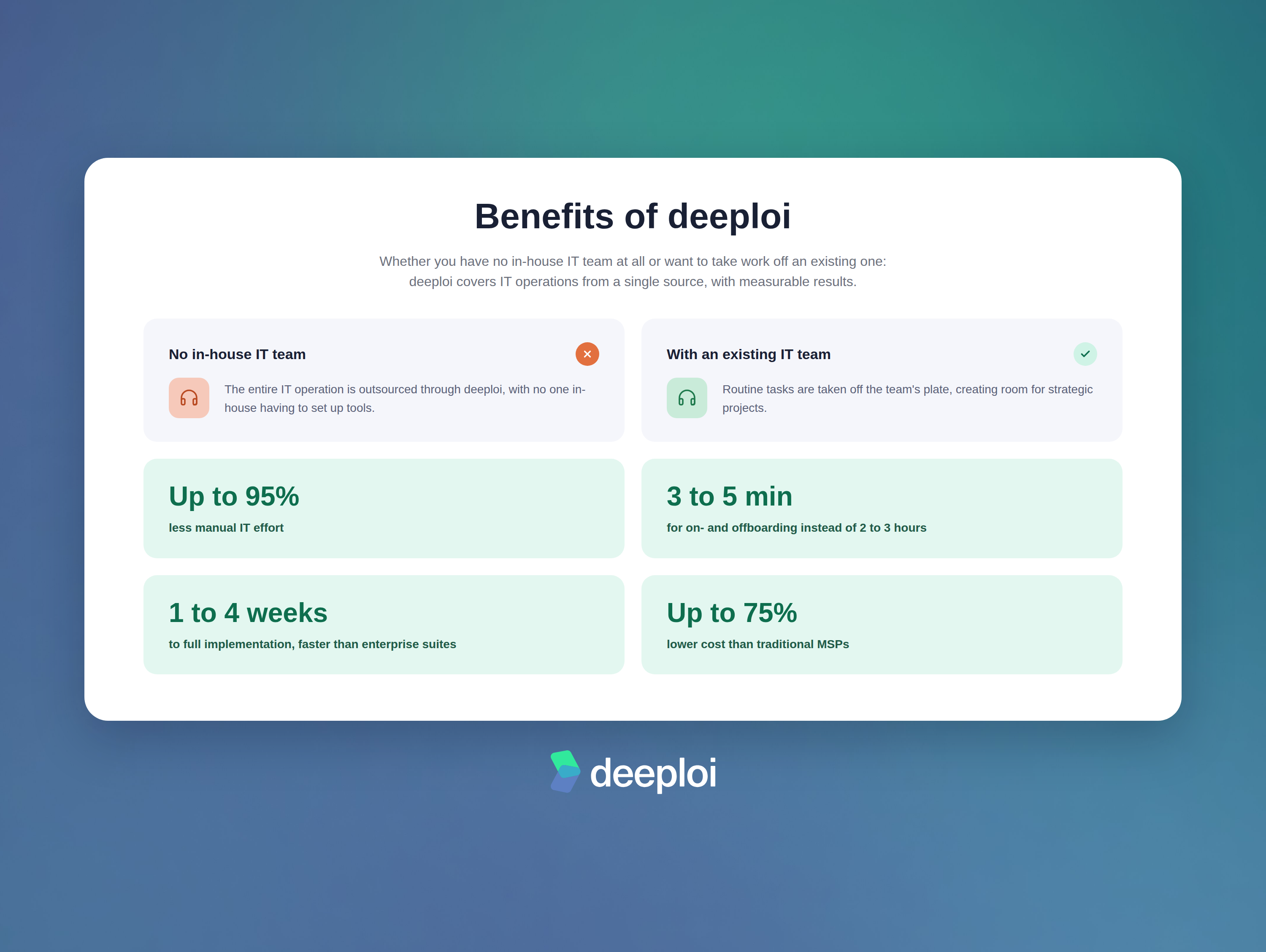
- Companies with no in-house IT team at all outsource the entire operation.
- Companies with an existing IT team get relief from routine requests and free up room for strategic projects.
- Altogether, manual IT effort drops by up to 95%.
- Migration and setup of device management are included with no setup fee, even if you're already running an MDM and switching from it.
- Onboarding takes 3–5 minutes instead of the usual 2–3 hours.
- During offboarding, freed-up licenses are automatically reclaimed, so you're not still paying for unused seats.
- Implementation is completed within 1–4 weeks depending on company size, considerably faster than with enterprise suites.
- Compared with traditional MSPs, companies save up to 75% in costs.
Conclusion: ITOM is no longer an enterprise privilege
ITOM isn't something that only works with a dedicated ops team or a six-figure tooling budget. Asset management, patch management, software deployment, monitoring, CMDB, and support can be covered at every growth stage. What matters is how: cobbled together manually, through individual tools, or as an already-integrated platform like deeploi that brings all six functions from the start.
See how all six ITOM functions come together in one platform
No password-reset chaos in the ticketing system, no spreadsheet for devices and licenses, no days-long wait for ready-to-use laptops during onboarding: in a no-obligation demo, we'll show you how to get rid of that burden, with no in-house IT team required.
{{cta}}
Frequently asked questions
Is it worth adopting ITOM if the company already uses individual tools like a plain MDM?
Yes. As long as a company only covers ITOM through individual tools like a plain MDM, other core functions such as patch management, monitoring, or support often remain manual tasks. A consolidated all-in-one platform replaces this patchwork with a single system that covers all six ITOM functions together, reducing the number of tools and interfaces that need to be maintained separately.
What's the difference between ITOM and ITSM for companies without their own IT department?
Without an in-house IT department, the distinction rarely needs to be drawn strictly at an operational level: ITOM makes sure devices, networks, and software work, ITSM organizes how requests about them get handled. What matters more than the exact boundary is that both areas, ongoing operations and orderly support, are reliably covered at all.
Which ITOM tasks can a small IT team handle without dedicated ops specialists?
A small IT team can tackle five of the six ITOM core functions directly on its own: tracking assets, automating patches, standardizing software rollouts, setting up monitoring, and establishing a clear support channel. The CMDB largely takes care of itself, since the central overview provides that documentation along the way. None of these steps require dedicated IT expertise, they can be introduced gradually, and they noticeably relieve the existing team of routine tasks. Even so, each one remains an ongoing effort running alongside day-to-day business. An all-in-one IT management platform like deeploi covers the same functions bundled together, so the team doesn't have to build and maintain them individually and is instead freed up for strategic projects.
How long does it take to introduce ITOM practices at a growing company?
That depends heavily on the approach you choose. Full-featured enterprise suites often need a dedicated project team and a correspondingly long lead time. A managed all-in-one platform like deeploi, by contrast, delivers the same six ITOM core functions within 1–4 weeks, depending on company size.
Is ITOM worth it for companies that already have a small IT team?
Yes. Even with an existing IT team, a structured ITOM practice is worth it, because it automates routine requests like password resets or simple software questions and gives the team time back for strategic projects. ITOM relieves an existing team of the tasks that add the least strategic value, rather than replacing it.



.png)

