









Direct Answer
MDM (mobile device management) is software that gives a company central control over every laptop, phone, and tablet employees use for work, letting you enforce security rules, push updates, and remotely wipe a lost device from one dashboard. It matters most for growing companies without a dedicated IT team, since it replaces manual, error-prone device tracking with automatic enforcement and an audit trail for compliance and security questionnaires.
Key Takeaways
Mobile device management (MDM) is a category of software that gives your company central control over every laptop, phone, and tablet employees use for work, so you can enforce security rules, push updates, and wipe a lost device remotely.
MDM is not a single product: dozens of solutions exist across Apple, Windows, and Android, ranging from self-managed tools to fully managed services.
Most growing companies hit the point where they need MDM somewhere between 20 and 50 employees, when spreadsheets can no longer track who has which device or whether encryption is turned on.
Skipping MDM means a stolen laptop could expose customer data with no way to lock it remotely, and auditors or clients filling out security questionnaires will notice the gap quickly.
Platforms like deeploi handle MDM automatically as part of a broader IT management service, so you don't need to become an IT expert to keep your devices secure.
If the term "MDM" keeps showing up in security questionnaires, vendor pitches, or compliance conversations, and nobody has explained it to you without drowning you in acronyms, this guide is for you.
Mobile device management (MDM) is software that gives a company central control over every laptop, phone, and tablet employees use for work, letting someone enforce security rules, push updates, and remotely wipe a lost device from a single dashboard. Think of it as the remote control for your entire fleet of company hardware. Instead of walking over to someone's desk (or shipping a laptop back) every time a setting needs to change, MDM lets you do it from one screen.
This guide explains MDM in plain language for HR managers, office managers, and founders who ended up responsible for IT without choosing to be. We'll cover what MDM actually does, when a growing company needs it, what happens without it, and how to get started without a technical background. If you're looking for a platform that handles MDM as part of a broader endpoint management service, deeploi is one example: it automates device setup, security enforcement, and ongoing management from a single dashboard, without requiring a dedicated IT team.
Let's start with the basics.
What does MDM actually do?
MDM software sits between you and every device your company owns (or allows employees to use for work). It gives you four core capabilities that, together, keep company data safe and devices under control. Here's what each one means in everyday terms.
Enforcing passcodes and disk encryption
The simplest thing MDM does is also one of the most important: it makes sure every device has a proper password and that the hard drive is encrypted. Encryption (sometimes called disk encryption or full-disk encryption) scrambles all the data stored on a device so that nobody can read it without the correct password or recovery key. On a Mac, this feature is called FileVault. On Windows, it's called BitLocker.
Without MDM, you're relying on every employee to turn these features on themselves. Some will, some won't, and you'll have no way to know who did what. With MDM, you set the rule once, and it applies to every device automatically. If someone tries to skip the passcode screen, the policy catches it. You can learn more about how this works in practice in our guide on how to enforce disk encryption on Mac and Windows.
Pushing software updates and configurations remotely
Operating system updates patch security holes. App updates fix bugs and close vulnerabilities. But left to their own devices (literally), employees postpone updates for weeks or months. MDM lets you push updates to every managed device from one place, set deadlines, and verify that the update actually installed.
Beyond updates, MDM can push configurations: Wi-Fi passwords, VPN settings, email accounts, even specific apps. When a new hire starts, their device can arrive pre-loaded with everything they need. When a company-wide setting changes, you push it once instead of emailing instructions to 80 people and hoping everyone follows them.
Remote lock and wipe for lost or stolen devices
This is the feature that makes executives sit up straight. If a laptop gets left in a taxi or a phone disappears at a conference, MDM lets you lock it immediately or wipe it completely, erasing every piece of company data. The device becomes a blank slate.
Without this capability, a lost laptop is an open book. Anyone who finds it (or steals it) can potentially access emails, client files, and internal systems. According to research by the Ponemon Institute, lost laptops cost enterprises an average of $49,246 each when you factor in lost data, lost hardware, lost productivity, and breach remediation (Ponemon Institute). And roughly 4.3% of company-issued smartphones are lost or stolen every year (McAfee). MDM turns a potential disaster into a 30-second fix. For a step-by-step response plan, see our guide on what to do when a company device is lost or stolen.
Separating work data from personal data (BYOD)
BYOD stands for "bring your own device." It means employees use their personal phone or laptop for work. More than 95% of organizations allowed this even before the pandemic (Expert Insights). The challenge: you need to protect company data on that device without controlling the employee's personal photos, messages, or apps.
MDM solves this by creating a separate container (sometimes called a work profile) on the device. Company apps and data live inside that container. Personal apps and data live outside it. If the employee leaves the company, you can wipe the work container without touching anything personal. If you're weighing whether BYOD or company-owned devices make more sense for your team, we've broken down the tradeoffs in our comparison of BYOD vs. company devices.
Why does a growing company need MDM (even without an IT team)?
You might think MDM is something only large enterprises with dedicated IT departments worry about. In practice, it's often the companies without IT teams that need it most, precisely because nobody is watching the devices full-time. Here are the triggers that typically force the conversation.
The tipping point: when spreadsheets stop working
At 5 or 10 employees, you can probably track devices in a spreadsheet. You know who has which laptop because you handed it to them yourself. But somewhere between 20 and 50 people, that breaks down. New hires start every month. People switch roles. Someone leaves and you're not sure if their laptop had encryption turned on or if they still have access to the company Google Workspace.
This is the tipping point. The spreadsheet doesn't tell you whether a device is compliant, it only tells you it exists (assuming someone remembered to update it). MDM replaces the spreadsheet with a live dashboard: every device, its owner, its OS version, its encryption status, and its last check-in, updated automatically. For a broader look at how to centrally document and manage hardware, our IT asset management lifecycle guide walks through the full process.
Security questionnaires and compliance pressure
If your company sells to other businesses, especially in finance, healthcare, or the public sector, you've probably seen security questionnaires. They ask questions like: "Do you enforce disk encryption on all endpoints?" "Can you remotely wipe a lost device?" "How do you ensure OS patches are applied within 30 days?"
Without MDM, the honest answer to most of these is "we ask employees to do it, but we can't verify." That answer loses deals. It also creates problems with compliance frameworks like ISO 27001 and, increasingly in Europe, the NIS2 directive, which extends cybersecurity obligations to thousands of mid-sized companies. MDM gives you the enforcement mechanism and the audit trail to answer those questions confidently. Our GDPR IT compliance checklist covers additional controls you'll want in place.
Onboarding and offboarding at speed
When you hire three people in a week, manually setting up each laptop takes hours. Install the OS, create accounts, configure email, set up the VPN, install Slack, enable encryption, set a password policy. Multiply that by three, and someone just lost a full day.
MDM automates most of that. A new device can be pre-configured so that when the employee powers it on for the first time, all the apps, accounts, and security settings are already there. Offboarding is just as important: when someone leaves, MDM lets you revoke access and wipe company data in minutes, not days. Considering that 70% of intellectual property theft occurs within the 90 days before an employee's resignation announcement (CurrentWare), speed matters.
For companies using Personio as their HR system, our guide on automated IT onboarding with Personio shows how the two systems can work together.
What happens if you skip MDM?
Understanding the upside of MDM is useful. Understanding the downside of not having it is more convincing. Here's what the risk actually looks like.
Lost laptops with no way to remote-wipe them
A survey of 329 organizations found they had collectively lost more than 86,000 laptops, with the total cost reaching approximately $2.1 billion (Ponemon Institute / Intel). Without MDM, a lost device can't be locked or wiped remotely. If encryption wasn't enabled (and without MDM, you can't be sure it was), whoever finds that laptop can access everything on it.
The global average cost of a data breach reached $4.88 million in 2024, with 70% of breached organizations reporting significant or very significant disruption (IBM). Even if your company is too small to face a multi-million-dollar breach, the cost of notifying affected customers, engaging legal counsel, and rebuilding trust with clients adds up fast.
No visibility into who has access to company data
Without MDM, you don't really know which devices are accessing company systems. Is a former employee still logging into your project management tool from their old phone? Did a contractor install company email on a device shared with family members? Nearly 90% of former employees maintain access to sensitive corporate systems and data after their departure (Proton).
The average employee uses 29 different SaaS applications (The Hacker News), so the attack surface is much wider than just email. MDM gives you a real-time inventory of every device that's connected, what's installed on it, and whether it meets your security standards. Our guide on IT security for small businesses explains how to close these gaps even without dedicated IT staff.
Audit failures and insurance gaps
Cyber insurance providers increasingly ask whether you have MDM in place. If you don't, premiums go up or coverage gets denied. Auditors conducting ISO 27001 or SOC 2 assessments look for evidence that security policies are enforced on endpoints, not just written in a document.
Without MDM, you can't prove enforcement. You can write a policy saying "all laptops must use encryption," but without a system that verifies compliance device by device, that policy is just paper. The same applies to client audits: larger customers reviewing your security posture will notice when you can describe your policies but can't show a dashboard proving they're applied.
{{cta}}
Does MDM work differently on Apple and Windows devices?
Yes, and if your company uses both (which most do), it's worth understanding the difference at a high level. You don't need to master the technical details, but knowing the landscape helps you ask better questions when evaluating MDM tools.
How Apple handles MDM
Apple built a native MDM framework directly into macOS, iOS, and iPadOS. The key piece for companies is Apple Business Manager (ABM), a free web portal from Apple where you register your organization and link it to your MDM solution. Once a device is purchased and enrolled through ABM, it automatically connects to your MDM server the first time it's powered on. The employee opens the box, turns on the laptop, and it configures itself: apps install, security policies apply, accounts are created.
This is sometimes called zero-touch enrollment because the IT person (or the person who accidentally became the IT person) doesn't need to physically touch the device. For Apple-focused teams, this is often the smoothest MDM experience. If your fleet is primarily Macs, our guide on Mac MDM for startups covers what you actually need.
How Windows handles MDM
Microsoft's equivalent system uses a combination of tools, most notably Microsoft Intune (Microsoft's cloud-based MDM) and Azure Active Directory (now called Microsoft Entra ID) for identity management. Windows has its own zero-touch deployment path called Windows Autopilot, which pre-configures devices before the employee opens the box.
The Windows ecosystem is powerful but more complex. Intune can manage iOS and Android devices too, but it's most deeply integrated with Windows. If your company already pays for Microsoft 365, you may already have an Intune license included in your plan, though having the license and having it configured are two very different things. Our comparison of Microsoft Intune alternatives can help you decide whether Intune is right for your team or if another approach fits better.
Mixed fleets: the common reality
Most growing companies don't have a pure Apple or pure Windows environment. Developers use Macs, sales teams carry Windows laptops, everyone has a phone. The MDM you choose needs to handle the platforms you actually use. Some tools specialize (Jamf is Apple-only, for example), while others cover multiple operating systems. A few, like deeploi, handle both Apple and Windows device management as part of a broader IT platform. For a closer look at the tradeoffs between the two ecosystems, see our Mac vs. Windows for business guide.
MDM vs. IT asset management: what is the difference?
These two terms get confused constantly, and it's easy to see why. Both involve keeping track of devices. But they do fundamentally different things, and most growing companies eventually need both.
What MDM controls
MDM is about security and configuration. It answers questions like: Is encryption turned on? Is the OS up to date? Can I wipe this device if it's lost? What apps are installed? MDM enforces rules and gives you remote control over the device's settings and data.
What IT asset management tracks
IT asset management (ITAM) is about the lifecycle and logistics of the hardware itself. It answers questions like: How many laptops do we own? Who is this one assigned to? When was it purchased? When does the warranty expire? Is it time to replace it? ITAM tracks ownership, cost, and condition from procurement through decommissioning.
Where they overlap and why you need both
MDM tells you that a device is compliant. ITAM tells you that the device exists, who has it, and what it's worth. Without MDM, you can track a laptop but can't secure it. Without ITAM, you can secure a laptop but might not know it's sitting in a drawer unused. Together, they give you complete visibility. Many modern IT platforms combine both functions in a single dashboard. For a deeper look at how to track the full hardware lifecycle, our IT asset management lifecycle guide covers the full process.
How do you track the full lifecycle of company devices?
A device's life doesn't start when an employee opens the box and end when they return it. There are distinct stages, and each one has decisions that affect security, cost, and compliance.
Procurement and registration
The lifecycle starts when you order the device. At this point, you decide the model, specs, and accessories. If you're using Apple Business Manager or Windows Autopilot, the device can be registered with your MDM before it even arrives. This means the moment it's powered on, it enrolls automatically.
For companies that don't have a procurement process yet, the practical guide on how to order and set up a laptop for a new employee walks through each step, from choosing the right specs to configuring the device before handover.
Assignment, redeployment, and return workflows
Once a device is set up, it gets assigned to an employee. When that employee changes roles, the device might need different software or permissions. When they leave, the device needs to be wiped, checked, and either reassigned to the next hire or put into storage.
This cycle, assignment, redeployment, return, is where things break down without a system. Devices get forgotten in drawers. Former employees keep laptops for weeks after their last day. Nobody knows which devices are available for the next new hire. MDM (combined with asset tracking) keeps this loop tight. For remote teams, where you can't just walk over and collect a laptop, our guide on remote onboarding without an office explains how to handle this smoothly.
Decommissioning and secure data removal
Eventually, every device reaches end of life. The hard drive might be failing, the battery might be shot, or the hardware just can't run the latest OS. At that point, you need to securely erase all company data before selling, recycling, or disposing of the device. MDM makes the wipe verifiable: you can confirm from the dashboard that the device was erased, rather than trusting that someone remembered to do it.
What should you look for when choosing MDM software?
The MDM market is large and growing fast. It was estimated at $7.67 billion in 2024 and is projected to reach $28.37 billion by 2030 (Grand View Research). That means you have plenty of options, but also plenty of noise. Here's what actually matters when you're evaluating tools.
OS coverage: Apple, Windows, Android, or all three
Start with the devices you already have. If everyone uses Macs, an Apple-specific MDM like Jamf might be enough. If you're a Microsoft shop, Intune is likely already bundled with your Microsoft 365 plan. If you have a mixed fleet (which is more common than not), you need a tool that covers all your platforms without requiring separate admin consoles for each. Our Apple MDM comparison for 2026 covers the Apple-focused options in detail.
Zero-touch enrollment support
Zero-touch enrollment means a new device configures itself the first time it's turned on, without anyone from IT having to set it up manually. This is a major time saver, especially if you hire frequently or have remote employees. Look for support for Apple Business Manager (for Macs and iPhones), Windows Autopilot (for Windows PCs), and Android Zero-Touch Enrollment.
Integration with HR systems and identity providers
The most manual, error-prone part of device management is the handoff between HR and IT. Someone gets hired in Personio or BambooHR, and then someone else has to manually set up their laptop, accounts, and permissions. The best MDM tools integrate with your HR system so that a new hire triggers device provisioning automatically, and a departure triggers deprovisioning.
Similarly, integration with identity providers (like Google Workspace, Microsoft Entra ID, or Okta) means you can tie device access to the employee's identity. When you disable their account, access stops everywhere.
Pricing models and hidden costs
MDM pricing typically works in one of three ways: per device per month, per user per month, or as part of a larger platform bundle. Per-device pricing is straightforward but can get expensive if employees carry multiple devices. Per-user pricing is simpler if each person has a phone and a laptop. Bundled pricing (where MDM is part of a broader IT management platform) can be the most cost-effective if you'd otherwise need to buy separate tools for asset tracking, security, and support.
Watch for hidden costs: setup fees, premium support tiers, charges for additional features like remote wipe or reporting. If you want a side-by-side vendor comparison, our detailed breakdown of the 11 best MDM software solutions for 2026 covers pricing, features, and which tool fits which type of company.
How can you manage devices without becoming an IT expert?
This is the real question for most readers of this guide. You understand why MDM matters. You know what to look for. But you don't want to spend your Tuesday afternoons configuring enrollment profiles and debugging policy conflicts. Here's how to think about your options.
Automated MDM: what it means in practice
Automated MDM means the heavy lifting happens in the background. When a device is purchased and registered, it enrolls itself. When an employee is added to the HR system, their device, apps, and accounts are set up automatically. When a security policy changes, it propagates across the fleet without manual intervention.
This is different from traditional MDM tools, which give you a powerful console but leave you responsible for configuring everything yourself. Automation is the difference between having a toolbox and having a mechanic.
When to bring in a managed IT partner vs. doing it yourself
If you have someone on your team who is technically comfortable and has time to learn the MDM console, a self-managed tool like Jamf, Intune, or Hexnode can work well. You'll need to invest time in setup, ongoing configuration, and troubleshooting, but you'll have full control.
If nobody on your team fits that description (which is common: 60% of SMEs say security is their biggest IT challenge (JumpCloud)), a managed IT service makes more sense. Instead of learning to operate the console yourself, you hand it off to a team that runs it for you. The tradeoffs between these two models, pure MDM tools vs. managed IT services, are explored in depth in our comparison of MDM vs. managed IT services.
How deeploi handles device management automatically
deeploi is an all-in-one IT management platform, not just an MDM tool. MDM is one component of what it covers, alongside onboarding and offboarding automation, software management, cybersecurity, and IT support.
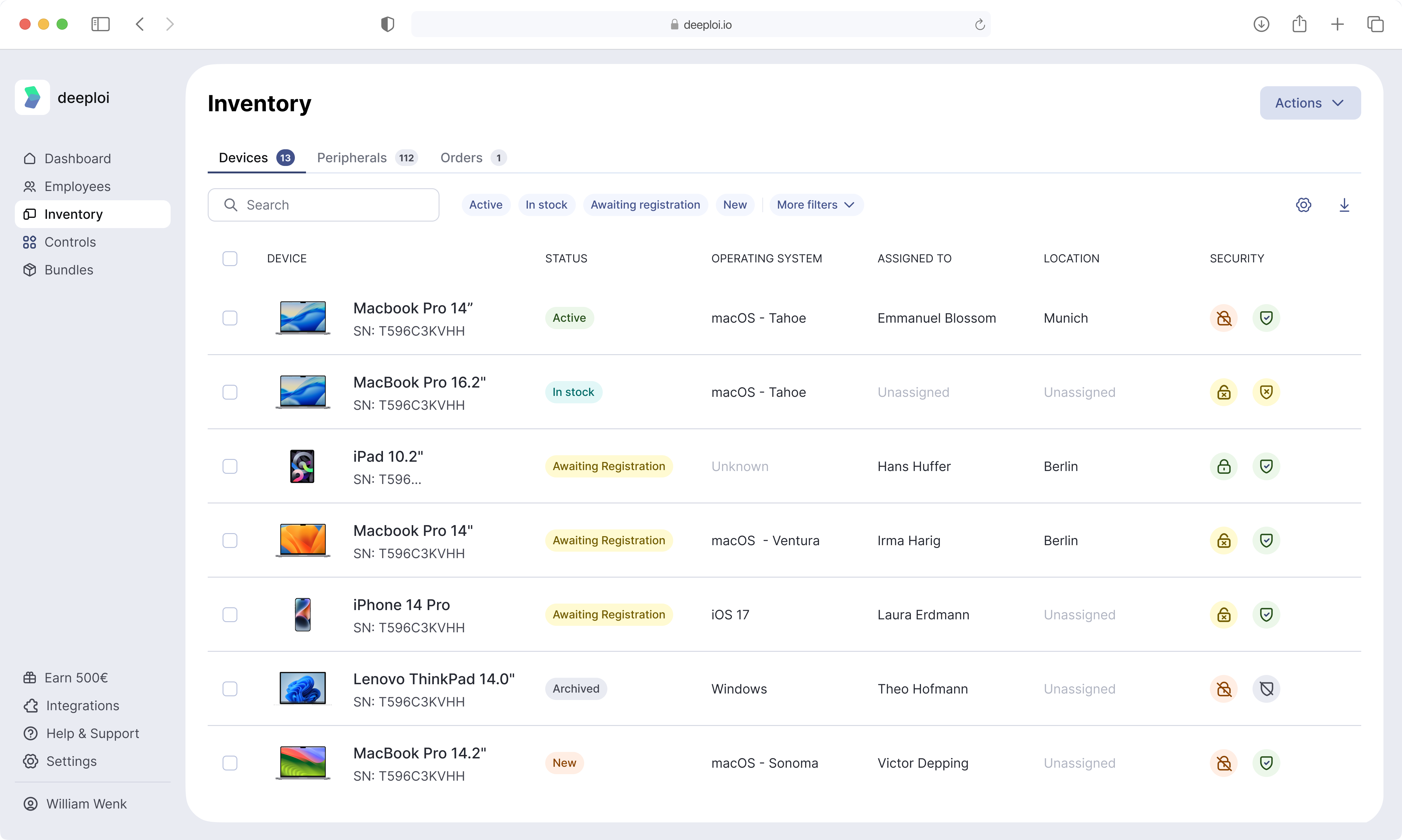
From the deeploi dashboard, you can see every device in your company, its owner, OS version, installed apps, and security status. Encryption is enforced on all managed devices automatically, and Security+, an optional add-on, adds endpoint protection against malware and unauthorized access on macOS and Windows. When a new employee is added, their device can be pre-configured through Apple Business Manager so it arrives ready to use the moment it's powered on.
The platform also tracks the tools an SMB actually needs to operate, so you're not juggling a patchwork of separate security, support, and management subscriptions. For companies that want to explore alternatives to Miradore or similar lightweight MDM tools, our comparison of Miradore alternatives includes deeploi alongside other options.
{{cta}}
BYOD, shadow IT, and the MDM blind spots most companies miss
MDM works well when devices are company-owned and enrolled. But the reality for most growing companies is messier: employees use personal phones for Slack, personal laptops for "just one thing," and sign up for tools without telling anyone.
The BYOD gap
Only 40% of organizations with BYOD programs have actually implemented MDM solutions, compared to a 93% implementation rate among organizations that issue corporate devices (SNS Insider). That gap represents a massive blind spot. If employees access company email, documents, or messaging on personal devices without MDM, you have no ability to wipe company data if that device is lost or the employee leaves.
An estimated 4.1 million phones are lost or stolen each year (SimpleMDM), and 85% of employees report working remotely during off hours or outside a traditional office schedule (ConnectWise). Work and personal life blend together on the same hardware, and without MDM, your company data goes wherever that device goes.
Shadow IT: tools you didn't approve and can't see
Shadow IT refers to any software, app, or cloud service that employees use for work without formal approval. It's not malicious. It's someone signing up for a free project management tool because the approved one felt clunky. But it means company data lives in places you can't see, can't secure, and can't audit.
MDM won't eliminate shadow IT entirely, but it helps. By deploying approved apps automatically and restricting unapproved installations on managed devices, you reduce the surface area. Combined with a SaaS management layer, you can see which tools employees are actually using and decide whether to adopt, replace, or block them. The cybersecurity guide for small businesses covers broader strategies for managing these risks.
Offboarding: the most dangerous moment
The riskiest moment in any device's lifecycle is when an employee leaves the company. If offboarding is slow or incomplete, the departing employee keeps access to company systems, files, and data. According to one study, 89% of former employees were able to access sensitive corporate applications well after their departure (CurrentWare).
MDM gives you the ability to wipe the device remotely (or wipe just the work container on a BYOD device) the moment someone's last day is confirmed. Combined with identity provider integration, this means account access and device data disappear together, within minutes rather than weeks.
How is the MDM market changing?
MDM is not a niche technology anymore. Understanding where the market is heading helps you make a choice that won't be obsolete in two years.
Rapid growth, especially among SMEs
The SME segment of the MDM market is projected to grow at the largest CAGR of 27.3% through 2032, driven by the growing need for SMEs to improve cybersecurity, simplify operations, and adhere to industry regulations (SNS Insider). This isn't surprising: as smaller companies face the same compliance requirements and security threats that large enterprises do, they need the same foundational tools.
Smartphones continue to dominate, accounting for over 54% of the MDM market revenue in 2024 (Grand View Research), but laptop and desktop management is increasingly bundled into the same platform. The days of "mobile" device management being only about phones are over.
From MDM to UEM: broader coverage
Unified Endpoint Management (UEM) is the evolution of MDM. Where MDM originally focused on phones and tablets, UEM covers everything: laptops, desktops, phones, tablets, and sometimes even IoT devices like printers and conference room screens. In practice, most tools marketed as MDM today already handle laptops and desktops too, so the line is blurring.
For the HR manager or office manager choosing a tool, the practical takeaway is: don't buy something that only manages phones if your bigger concern is laptops. Ask whether the solution covers every device type your company actually uses.
IT leaders want fewer tools, not more
72% of IT leaders surveyed cited challenges with their current identity and MDM providers (Expert Insights). The trend is toward consolidation: instead of buying separate tools for MDM, asset tracking, identity management, and IT support, companies want one platform (or at most two) that covers the full picture. This is especially true for smaller companies where the person managing IT also manages onboarding, offboarding, and vendor relationships.
{{cta}}
Key takeaways
- Start with the two most impactful MDM features, remote wipe and disk encryption enforcement, and build from there; everything else can wait until those are solid.
- If your company has more than 20 employees and nobody can tell you right now which devices have encryption turned on, treat MDM as urgent rather than aspirational.
- Choose an MDM solution based on the operating systems your team actually uses and the level of ongoing management you can realistically sustain; a powerful tool nobody configures is worse than a simple one that's fully deployed.
- If you don't have (and don't want) a dedicated IT team, look for a managed IT platform that includes MDM rather than a standalone MDM console you'll need to operate yourself.
- Review your offboarding process today: confirm that you have a reliable way to revoke device and application access the same day an employee's last day is confirmed.
Frequently asked questions
Do I need MDM if every employee uses their own device?
Yes, arguably more so. When employees use personal devices for work (BYOD), company data lives on hardware you don't own and can't physically collect. MDM creates a separate work container on those devices, letting you wipe company data when someone leaves without touching their personal files. Without it, you have no way to remove company information from a device you don't control.
Can I set up MDM without an IT department?
You can. Many MDM tools are designed to be configured by non-technical administrators. The real question is whether you'll have the time and willingness to maintain it over months and years: updating policies, enrolling new devices, troubleshooting issues. If not, a managed IT service that handles MDM for you is a more realistic path.
Is MDM only for phones, or does it cover laptops too?
Modern MDM covers laptops, desktops, tablets, and phones. The term "mobile" is a holdover from when MDM was first introduced for smartphones. Today, managing employee laptops is typically the higher priority for most companies. Look for a solution that covers all the device types your team uses.
How long does it take to roll out MDM for a 50-person company?
If you're using a managed service, initial setup can happen in days. Enrolling existing devices typically takes one to two weeks, depending on how many employees need to take action (like restarting their laptop or approving an enrollment profile). New devices purchased going forward can be enrolled automatically through zero-touch programs, requiring no manual effort.
What is the difference between MDM and endpoint security software?
MDM manages and configures devices: enforcing passwords, pushing updates, and wiping lost hardware. Endpoint security (sometimes called EDR or antivirus) actively protects devices from malware, ransomware, and other threats. Think of MDM as the rules and controls, and endpoint security as the guard watching for intruders. Most companies need both, and many platforms bundle them together.
How much does MDM software typically cost?
Pricing ranges from around $2 to $9 per device or per user per month, depending on the platform and feature tier. Some tools (like Microsoft Intune) may already be included in your Microsoft 365 subscription. Others charge separately for premium features like advanced reporting or remote support. Always check what's included in the base price versus what's an add-on.
What is zero-touch enrollment and why does it matter?
Zero-touch enrollment means a new device configures itself automatically the first time it's turned on, connecting to your MDM, installing required apps, applying security policies, and creating user accounts, without anyone from your team touching it. This matters because it dramatically reduces setup time and means remote employees can receive a laptop by mail and start working immediately.
Does MDM let me see what employees are doing on their devices?
MDM shows you device-level information: which apps are installed, whether the OS is up to date, whether encryption is enabled, and where the device last checked in. It does not (and should not) monitor employee activity like browsing history, keystrokes, or personal messages. The goal is security and compliance, not surveillance. On BYOD devices, the work container is the only thing visible to the administrator.
What is the difference between MDM and mobile application management (MAM)?
MDM manages the entire device: settings, security, updates, and remote actions. MAM (mobile application management) manages only specific work apps and the data inside them, without controlling the rest of the device. MAM is often used on personal devices where employees don't want their entire phone managed by their employer. Some platforms offer both, letting you choose the right level of control for each situation.
Should I choose a standalone MDM tool or a broader IT management platform?
It depends on the size and complexity of your IT needs. If the only thing you need is device management, a standalone MDM tool might be enough. But if you also need help with onboarding, offboarding, IT support, cybersecurity, and asset tracking, a platform that bundles these together saves time and reduces the number of tools you manage. For most SMEs, the bundled approach ends up being both cheaper and easier to operate.
Is MDM necessary for companies with fewer than 20 employees?
It's not strictly necessary, but it's still valuable. Even a 10-person team has devices with company data on them, and losing one laptop without the ability to remote-wipe it creates the same risk whether you have 10 employees or 200. The difference is the level of complexity you need. For very small teams, a lightweight MDM tool or a managed IT service that includes device management covers the basics without overwhelming you.