









Direct Answer
To avoid vendor lock-in, keep ownership of your admin accounts and data, test data exports before you buy, and avoid long contracts that auto-renew without an exit plan. Choose tools that support open standards and real integrations, stay cross-platform, document your setup, and review your stack once a year. From 12 January 2027, the EU Data Act bans cloud switching charges.
Key Takeaways
- Lock-in is more than technology: In SMBs, the biggest dependencies are often admin access and knowledge held by one provider or one person, not proprietary software.
- Test the exit before you sign: Check data exports, admin ownership, notice periods, and exit assistance before you buy any tool or service.
- The EU Data Act helps, but doesn't solve everything: Cloud switching charges are banned from 12 January 2027, but proprietary formats and missing documentation still keep you stuck.
- Some dependency is fine: Standardizing on one workspace suite can be a smart choice, as long as you chose it deliberately and know your way out.
- deeploi builds on the tools you already use: Google Workspace or Microsoft 365, your HR system, and cross-platform device management, all visible in one dashboard instead of in one person's head.
Your IT service provider gives notice, and you realize nobody in the company has the admin passwords. Or your HR tool doubles its price at renewal, and exporting your data turns out to mean a stack of PDFs. That's what vendor lock-in looks like in a growing company, and it's why learning how to avoid vendor lock-in matters before you add the next tool, not after. At deeploi, we work with more than 200 SMBs, and the pattern is always the same: lock-in rarely comes from one big decision. It builds up quietly, one tool, one contract, and one undocumented setting at a time. This guide shows you the five types of lock-in in an SMB IT stack, seven steps to stay flexible, what the EU Data Act changes in 2027, and the questions to ask every vendor, including us.
What is vendor lock-in, and why do SMBs feel it first?
Vendor lock-in means you depend on a provider so heavily that switching becomes too expensive, too risky, or simply impossible. The cause can be technology, data, contracts, or knowledge. The effect is always the same: the vendor sets the terms, and you accept them.
Small and mid-sized companies feel this earlier than large enterprises for three reasons. First, there's rarely an IT department that evaluates tools with an exit in mind. Decisions are made quickly, often by an HR manager, an office manager, or a founder who took on IT alongside their real job, the accidental IT owner. Second, SMBs have little negotiating power at renewal. Third, teams buy their own tools. BetterCloud reports that 44% of apps are not IT-sanctioned, and every one of them is a dependency nobody is managing.
The 5 types of vendor lock-in in an SMB IT stack
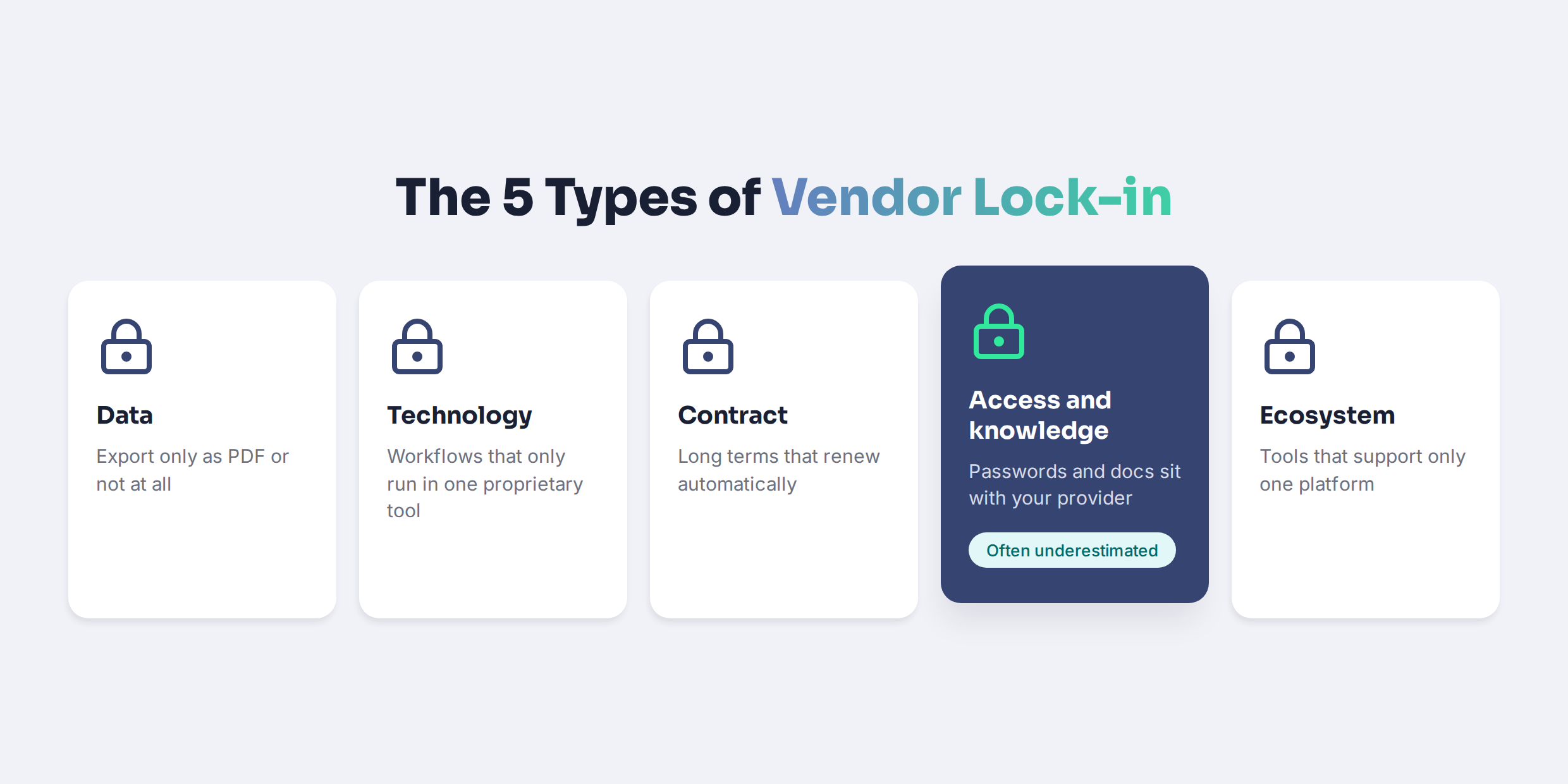
Most articles on vendor lock-in talk about cloud infrastructure and data centers. In a company with 30 to 150 employees, lock-in looks different. These are the five types we see most often:
The fourth type is the one most SMBs underestimate. As Computerwoche points out, lock-in can come from specialized skills and knowledge, not just from contracts and technology. If one provider or one employee holds every password and every piece of documentation, you're locked in, no matter how open your tools are.
How to avoid vendor lock-in in 7 steps
These steps work whether you're building your IT stack from scratch or cleaning up an existing one. You don't need to do everything at once. Start with steps 1 and 2, because they protect you the most.
1. Own your admin accounts and identities
Every core system, from your workspace suite to your HR tool, should have admin accounts that belong to your company, not to a provider or a former employee. Keep at least two named admins per system, store credentials in a company password manager, and make sure your domain and DNS are registered in your company's name. If a provider leaves, you should still be able to log in the next morning.
2. Test the data export before you buy
Before you sign, ask for a test export. Can you get all your data, including history, attachments, and settings, in a standard format such as CSV, JSON, or XML? Is it self-service, or only on request? A tool that makes it easy to get data in but hard to get it out is telling you something about its business model.
3. Read the contract for the exit, not just the price
Check the minimum term, the notice period, and whether the contract auto-renews. Look for an exit assistance clause that defines what help you get when you leave and what it costs. Three-year terms with automatic renewal and a six-month notice period are one of the most common forms of lock-in in SMBs.
4. Choose tools that speak open standards
Single sign-on (SSO), automated user provisioning (SCIM), and documented APIs make tools replaceable, because other systems can connect to them in the same way. Prefer tools with real, maintained integrations over tools that only connect through manual workarounds or heavy customization.
5. Stay cross-platform
If your device management only supports one operating system, it decides what hardware you can buy. As your team grows, you'll likely have Mac, Windows, iPhone, and Android users. Choose device management that covers all of them, so your hardware choice stays a business decision.
6. Document your setup outside anyone's head
Write down which tools you use, who owns them, how they're connected, and how key processes work, such as onboarding and offboarding. Store that documentation in a place your company controls. This also makes changing your IT service provider far less risky, because the knowledge stays with you.
7. Review your stack once a year
Put a yearly stack review in the calendar, ideally before your biggest renewals. Check which tools are still used, which contracts renew soon, and where new dependencies have formed. A good moment for this is your annual IT budget planning, when you're looking at every license anyway.
Keep control of your IT without becoming an IT expert. With deeploi, devices, accounts, and licenses are visible in one dashboard that belongs to your company. Book your demo
What the EU Data Act changes in 2027, and what it doesn't
The EU Data Act is the most important regulatory change for vendor lock-in in years. Its switching rules have applied since 12 September 2025, and from 12 January 2027, providers of data processing services may no longer charge switching fees at all.
For SMBs, three points matter:
- No more switching charges: From 12 January 2027, providers can't charge you for switching, including data egress fees during a switch. Until then, only reduced, cost-based charges are allowed.
- Shorter notice periods: The notice period for exercising your switching rights must not exceed two months.
- It applies to every provider with EU customers: The deadline applies to all providers serving EU customers, not just European vendors.
But the Data Act doesn't solve everything. A free switch doesn't help if your data sits in a format only the original tool can read, if your workflows depend on proprietary features, or if nobody knows how your setup works. And watch your renewals: if a contract auto-renews before January 2027, you may stay tied to old clauses for years. Check your contracts with your legal advisor, especially the ones that renew in the coming months.
When some lock-in is actually fine
Avoiding vendor lock-in doesn't mean avoiding every dependency. Standardizing on Google Workspace or Microsoft 365, for example, saves time, simplifies security, and makes onboarding easier. Deep integration between a few well-chosen tools is often more efficient than a patchwork of interchangeable ones.
The difference is whether the dependency is deliberate. Good lock-in is chosen consciously, priced into your planning, and comes with a known way out. Bad lock-in happens by accident and only becomes visible when it's expensive. And even trusted vendors change course: after Broadcom acquired VMware, the previously open partner program was switched to an invitation-only model, forcing many smaller IT providers to adapt. That's why every dependency, even a good one, needs an exit plan.
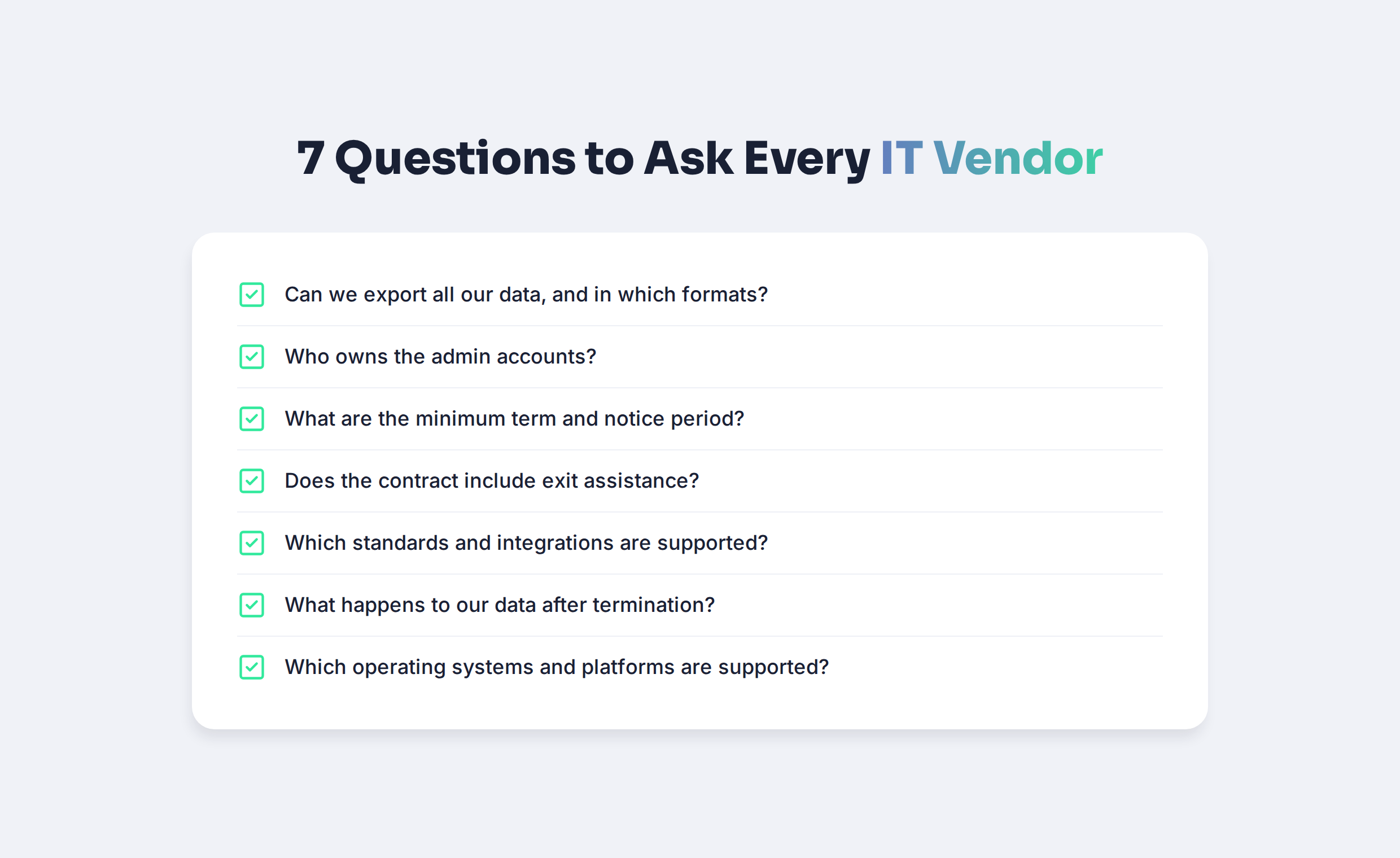
Exit checklist: questions to ask every IT vendor
Use these questions before you sign with any software vendor, MSP, or IT platform. Ask them of us too.
How deeploi keeps your IT stack flexible
We built deeploi as a platform that works on top of the tools you already use, not as a closed system that replaces them. Here's what that means in practice:
- Your existing tools stay: deeploi connects to Google Workspace or Microsoft 365 and to 11 HR and identity systems, including Personio, HiBob, BambooHR, Factorial, and Okta. See all integrations.
- Cross-platform device management: Manage macOS, Windows, iOS, and Android in one place, with integrations to Apple Business Manager and the open-source device management tool Fleet.
- Security from established providers: Endpoint protection runs through SentinelOne, a recognized standard in the market, not a proprietary in-house tool. Learn more about cybersecurity with deeploi.
- Knowledge in a dashboard, not in one person's head: Every device, account, and license is visible in one dashboard and assigned to a person. Onboarding and offboarding run as documented workflows, not as tribal knowledge.
- Transparent pricing: Per-user price with no pay-per-ticket fees. See our pricing.
If you're comparing options, our overview of alternatives to traditional MSPs and our MDM software comparison help you evaluate providers with the exit in mind. And if you need security and audit documentation, our compliance page shows what we cover.
See how flexible IT can work. Talk to our team about your current stack and where your dependencies are. Get in touch
Build your IT stack with the exit in mind
Vendor lock-in rarely starts with one bad decision. It grows from small ones: an admin password nobody wrote down, a contract that renewed quietly, a tool that only exports PDFs. You avoid it by owning your accounts and data, reading contracts for the exit, choosing open and cross-platform tools, and documenting your setup. With the EU Data Act removing switching charges in 2027, now is a good time to review your stack and your renewals.
Your IT, under your control. See how deeploi brings your tools, devices, and accounts together without locking you in. Book your demo
Frequently asked questions
What is vendor lock-in?
Vendor lock-in is a situation where you depend on one provider so heavily that switching becomes too expensive or risky. It can be caused by proprietary technology, data you can't export, restrictive contracts, or knowledge and admin access held by the provider.
Are Microsoft 365 and Google Workspace a lock-in risk?
To some degree, yes, but it's usually a dependency worth having. Both are widely used standards with established migration paths. The real risk is losing control of your admin accounts or building processes so customized that they can't move. Keep at least two company-owned admin accounts and export your data regularly.
How do I get out of an existing vendor lock-in?
Start by securing admin access and exporting your data, so you're not dependent on the vendor's cooperation. Then check notice periods and plan the switch in small phases, one system at a time. Moving everything at once creates new risks.
Does the EU Data Act apply to SaaS tools?
The Data Act covers data processing services, which includes most cloud and SaaS offerings used by businesses. From 12 January 2027, switching charges are banned. Exact scope can depend on the service, so check specific contracts with your legal advisor.
How can an IT service provider create lock-in?
Through access and knowledge. If your MSP holds all admin credentials, keeps documentation internally, and has set up systems only they understand, leaving becomes risky. Make sure admin accounts belong to your company and documentation is stored where you control it.


.png)

