









Direct Answer
Realistic IT budget planning for 2027 starts bottom-up, not with last year's number plus a percentage. Take stock of your devices and licenses, link costs to your hiring plan, and plan per employee. Factor in rising hardware and Microsoft 365 prices, budget security as a fixed cost, include internal IT time, and add a 10 to 15% buffer.
Key Takeaways
- Last year plus 5% is not a plan: A realistic IT budget starts from your device inventory, license renewals, and hiring plan, not from last year's total.
- Plan per employee, not per revenue: In growing SMBs, IT costs scale with headcount. Cost per employee is the number that actually predicts next year.
- 2027 brings real price pressure: Average PC prices are expected to rise 18.3% in 2026, and most Microsoft 365 business plans got more expensive at renewal from July 2026.
- Budget the hidden work: The hours your HR, office, or founding team spends on IT are a real cost. Put them in the budget so you can decide whether to keep paying them.
- Predictable IT costs with deeploi: Transparent per-user pricing with no pay-per-ticket fees, one inventory for all devices and licenses, and up to 75% lower IT costs compared to traditional MSPs.
It's October, finance wants next year's numbers by Friday, and the IT line says "last year plus 5%". That shortcut is how many SMBs approach IT budget planning for 2027, and it's why the budget breaks by March. At deeploi, we see the same pattern across more than 200 companies: laptops bought in clusters, licenses renewed on autopilot, and hours of hidden IT work that never show up in any spreadsheet. 2027 adds real pressure on top, with PC prices climbing and Microsoft 365 renewals getting more expensive. This guide shows you a realistic approach: what belongs in your IT budget, how to build it in seven steps, how much a small business should spend on IT, and how to make those costs predictable.
Why most SMB IT budgets miss reality
Most IT budgets in small and mid-sized companies don't fail because someone planned badly. They fail because nobody really planned at all. IT is often owned by an HR manager, an office manager, or a founder who took it on alongside their actual job, the person we call the accidental IT owner. They don't have the time or the data to build a bottom-up budget, so they extrapolate.
These are the gaps we see most often:
A realistic IT budget fixes these gaps with data you already have: your device inventory, your license list, and your hiring plan.
What belongs in a realistic IT budget for a small business
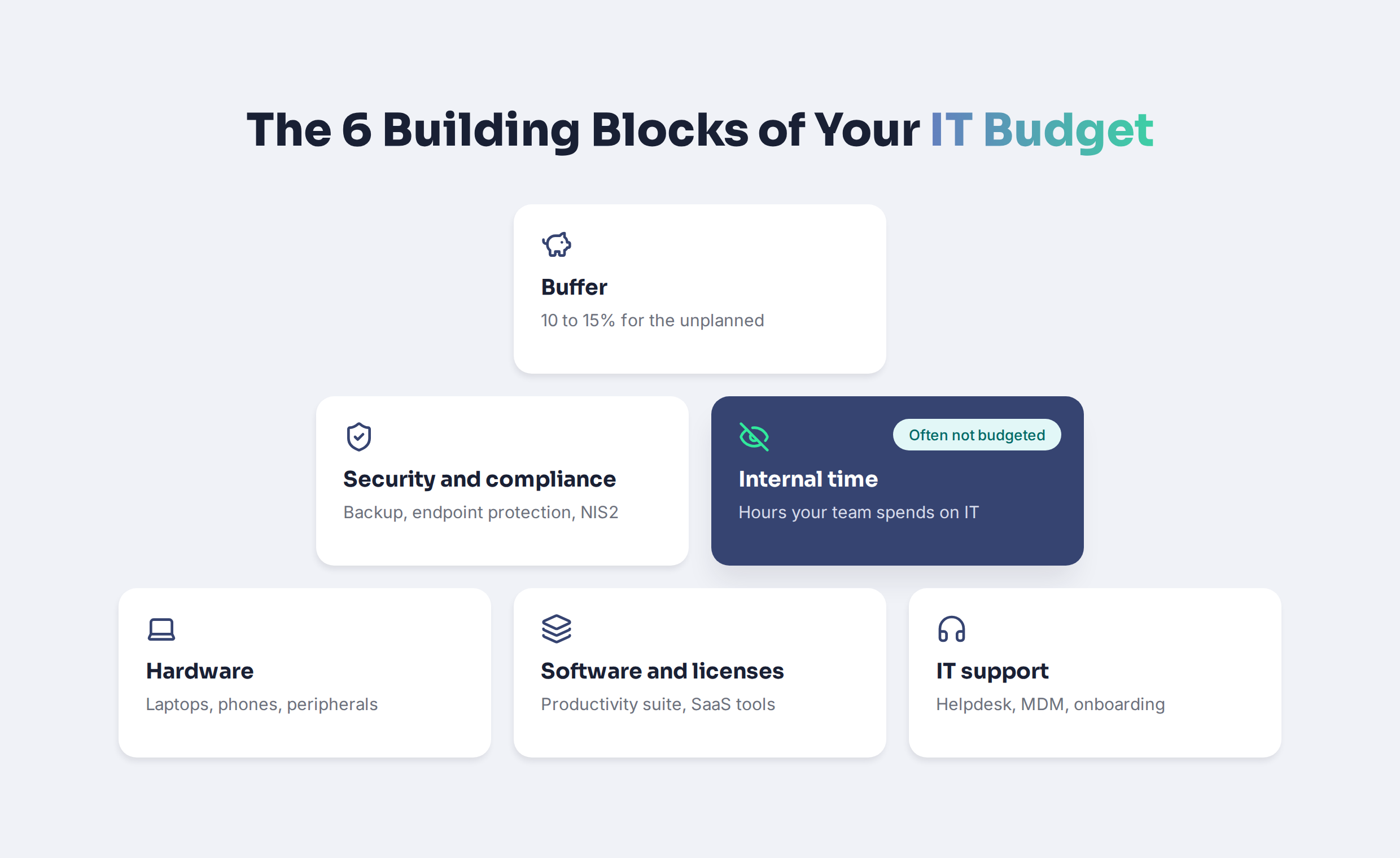
An IT budget for a small business covers more than hardware and software. It covers everything it takes to keep your team productive and your data safe for the next 12 months, including the work people do to keep IT running.
One decision affects almost every line: whether you buy or lease. Buying hardware is a capital expense (CapEx) that hits the budget in one go. Leasing turns it into a predictable operating expense (OpEx) spread across the device's lifetime, which makes growth years far easier to plan.
How to plan your IT budget in 7 steps
The steps below build your budget from the bottom up. Plan for one to two working days the first time. After that, it's an update, not a rebuild.
1. Take stock of what you have
List every device with its purchase date, assigned employee, and warranty status. Do the same for every software license: tool, number of seats, cost per seat, and renewal date. If this takes more than an afternoon, that's your first finding: without a central inventory, every later step is a guess. A platform with central device and license management gives you this list in minutes instead of days.
2. Connect the budget to your hiring plan
Ask HR or finance how many people you expect to hire and when, and how many will leave. Every new hire triggers a laptop, a license bundle, and an IT onboarding. Every leaver is a device to recover and licenses to cancel. Multiply your cost per employee by the planned headcount change, quarter by quarter.
3. Plan hardware by lifecycle, not by breakdown
Most business laptops are replaced every three to four years. Mark which devices hit that age in 2027 and spread replacements across quarters instead of buying everything at once. Factor in the price increases of 2026 rather than last year's purchase prices. If you're unsure whether extended coverage makes sense, see our guide to extended warranties and device insurance.
4. Audit licenses before they renew
Put every renewal date into a calendar and review it four to six weeks ahead. Remove seats of people who left, downgrade plans that are bigger than needed, and consolidate tools that do the same job. License optimization alone can cut software costs by up to 30%.
5. Budget security and compliance as fixed costs
Backup, endpoint protection, encryption, and security awareness are not optional extras. Treat them as a fixed line, not as something to fund when there's money left. If you work with larger customers or fall under NIS2, include documentation and audit preparation too. Our pages on cybersecurity and compliance show what a solid baseline looks like.
6. Choose your support model consciously
You have three options: an internal IT person, a traditional managed service provider (MSP), or a platform that combines automation with expert IT support. Compare them on total cost, including the internal time each model still needs from your team, and on how billing works. Pay-per-ticket models look cheap until a busy month.
7. Add a buffer and review quarterly
Add 10 to 15% for the unplanned: a stolen laptop, an urgent hire, a price change. Then review the budget every quarter against actual spend. A budget you look at four times a year stays realistic. A budget you set once in October is fiction by June.
Know exactly what your IT costs per employee. With deeploi, devices, licenses, and support run through one platform with transparent per-user pricing. Book your demo
How much should a small business spend on IT?
The most common rule of thumb is a share of revenue. Guides for small businesses typically quote 3 to 6 percent as a common range, with higher-growth and regulated businesses at the upper end. That's a useful sanity check, but a weak planning tool. Revenue can jump or stall without your laptop count changing at all.
For companies with 30 to 150 employees, IT cost per employee is the more realistic planning number. Almost every IT cost scales with people: devices, licenses, support, onboarding. If you know what one employee costs in IT per year, your budget follows your hiring plan automatically.
Here's an illustrative example for a 60-person company. The ranges are rough orientation values, not benchmarks. Replace them with your own figures from step 1.
Two lines decide where you land in that range. The first is software: tool sprawl is the fastest-growing cost in most SMBs. The second is internal time. At The Female Company, an HR employee spent around 30 hours a month on IT before switching to deeploi. Afterwards, it was less than one hour. That time is a budget line whether you write it down or not.
2027 IT budget cost drivers you can't ignore
Four developments will hit most SMB IT budgets in 2027. None of them is dramatic on its own. Together, they're the reason "last year plus 5%" won't hold.
Hardware prices. A global memory shortage, driven by demand from AI data centers, is pushing device prices up. IDC expects average PC prices to rise by 18.3% in 2026, and the shortage could last well into 2027. If 2027 is a refresh year for part of your fleet, budget with current prices, not the ones from your last order.
Microsoft 365 renewals. Microsoft raised commercial prices from 1 July 2026 for new subscriptions and renewals. Business Basic went up by about 16.7% and Business Standard by 12%, while Business Premium stayed flat. Many SMBs only feel this at their next annual renewal, which often falls into 2027.
AI tools. AI assistants are arriving as add-ons to tools you already pay for, and teams are adopting standalone tools on their own. Decide which ones you actually want to fund, and budget them as a separate line so they don't hide inside "software".
Security and compliance. Germany's NIS2 implementation has widened the circle of companies with formal security obligations, and many SMBs feel it indirectly through customer and supplier requirements. Plan for documentation, access management, and device security as recurring costs.
If you still run on-premises servers, check end-of-support dates too: Microsoft lists Windows Server 2016 reaching end of support on 12 January 2027.
How to make IT costs predictable
A realistic budget is only half the job. The other half is an IT setup where costs don't swing from month to month. That's exactly what we built deeploi for: one platform that combines automation with personal expert support, so growing companies get full IT without building an IT department.
Here's how that shows up in your budget:
- Transparent per-user pricing: One fixed amount per employee, with all support channels included and no pay-per-ticket fees. Your IT budget becomes headcount times a known number. See our pricing for details.
- One inventory for devices and licenses: Every laptop, phone, and license in one dashboard, assigned to a person. Step 1 of your budget planning takes minutes.
- Hardware procurement built in: Order devices through the platform, buy or lease on customizable terms, and receive them preconfigured. Leasing turns big hardware spikes into predictable monthly costs.
- Automated onboarding and offboarding: New hires are set up in 3 to 5 minutes instead of 2 to 3 hours, and leavers' licenses are deactivated centrally, so you stop paying for seats nobody uses.
- Less internal IT time: With a 12-minute average support response time, your team stops spending hours on IT tickets.
The numbers from our customers back this up. ease cut its IT costs by 40% after its internal admin left, The Female Company reduced IT costs by 62%, and Instaffo lowered costs by 75%. Across our customers, deeploi delivers up to 75% lower IT costs compared to traditional MSPs. For more levers beyond budgeting, read our guide to reducing IT costs without forced cuts.

Plan 2027 with IT costs you can predict. Talk to our team about what IT will cost per employee in your company. Get in touch
Your 2027 IT budget, built on facts
Realistic IT budget planning for 2027 doesn't need a finance degree. It needs your inventory, your renewal dates, your hiring plan, and an honest look at the time your team spends on IT. Build the budget per employee, plan for rising hardware and license prices, and review it every quarter. And if you'd rather have IT costs that follow headcount instead of surprises, that's what we're here for.
Your IT, planned and predictable. See how deeploi handles devices, licenses, onboarding, and support in one platform. Book your demo
Frequently asked questions
What percentage of revenue should a small business spend on IT?
Most guides quote 3 to 6% of revenue, depending on industry. Regulated and fast-growing businesses sit higher. For SMBs with 30 to 150 employees, cost per employee is a better planning number, because devices, licenses, and support scale with headcount, not revenue.
What should an IT budget template include?
At minimum: hardware, software and licenses, IT support and management, security and compliance, internal time spent on IT, and a 10 to 15% buffer. Add a column for renewal dates and one for planned headcount changes, so the template reflects what will actually happen next year.
How do I budget for hardware when prices are rising?
Plan replacements by device age, use current prices instead of your last order, and spread purchases across quarters. Leasing through integrated hardware procurement turns large one-off purchases into predictable monthly costs.
Should IT costs be CapEx or OpEx?
Both work, but growing SMBs usually benefit from more OpEx. Subscriptions, leasing, and per-user IT services spread costs evenly and scale with headcount. Big CapEx purchases make sense when you have the cash and plan to keep the asset for its full lifetime.
When should I start IT budget planning for next year?
Ideally in September or October, before finance closes the annual plan and before your biggest licenses renew. Start with the inventory, because every later step depends on it. If you need help building the baseline, our team can walk you through it.


.png)

