









Direct Answer
A working process for handing out and taking back company devices documents both ends as one continuous lifecycle, starting with a signed handover protocol at handout rather than at the exit interview. Without a structured process, companies recover only around 45% of devices, often after two weeks or more. deeploi automates this entire process, from device handout to return, so companies no longer depend on someone remembering to track it.
Key Takeaways
- Undocumented handover is the default, not the exception: most companies track who has which device through memory, Slack threads, and a spreadsheet someone updates when they remember to.
- The cost shows up when someone leaves, not when they join: 71% of HR professionals report at least one employee who never returned company equipment, at an average cost of $1,963 per device.
- The handover process starts at hiring, not at the exit interview: what you record on day one is what you'll be able to recover on the last day.
- In Germany, a signed handover protocol isn't just good practice, it's your legal safety net: employees have no right of retention over company equipment, but proving what was issued and when still falls on you.
- deeploi builds the handover record into the device itself: every laptop is tracked from procurement to return, so nothing depends on someone's memory.
Maria in HR gets a message: Tom is leaving in two weeks. She goes looking for a record of what IT equipment he has, a laptop, a monitor, maybe a company phone, and finds nothing official. The only place this information lives is in Tom's head and a year-old Slack thread. This is how most companies handle device handover: informally, from memory, until the day it fails. And it fails often. 71% of HR professionals report at least one departing employee who never returned company equipment, and the average unreturned device costs $1,963 in hardware alone. deeploi, the all-in-one IT management platform for growing companies, treats device tracking as part of the handover process itself rather than an afterthought. This article breaks down what a real handover process looks like, from the day a device goes out to the day it comes back, and why writing it down matters more than most companies realize.
Why "We Know Who Has What" Doesn't Scale
At 10 people, everyone in the company can name every laptop in the building and who has it. At 30 people, that shared memory starts to break. At 80 people, it's gone entirely, and nobody notices until an offboarding goes wrong.
This is one of the clearest signs that a company has outgrown its informal IT setup: a device handover process that lived in someone's head instead of a system. It's rarely a dramatic failure. It's a slow accumulation of small gaps: a laptop issued without a note of the serial number, a monitor nobody remembers assigning, a phone that "someone from the old team" still has.
The numbers back this up. Without a structured process, companies recover only around 45% of flagged devices, and typically wait two weeks or longer to get them back. 41% of companies fail to retrieve all company-owned devices during offboarding, and remote and hybrid teams struggle even more: 37% of remote employees report specific difficulties returning equipment, largely because there's no clear point of contact or process to follow.
None of this is a people problem. It's a documentation problem. The employees aren't hiding laptops. Nobody ever told them, in writing, what to return, when, or to whom.
The Device Lifecycle You Should Actually Document
A working handover process treats device handout and device return as two ends of the same record, not two unrelated events. If you only start thinking about tracking when someone resigns, you're already behind. The offboarding record should exist from day one, because it's built the same day the device goes out.
What to Record at Handout
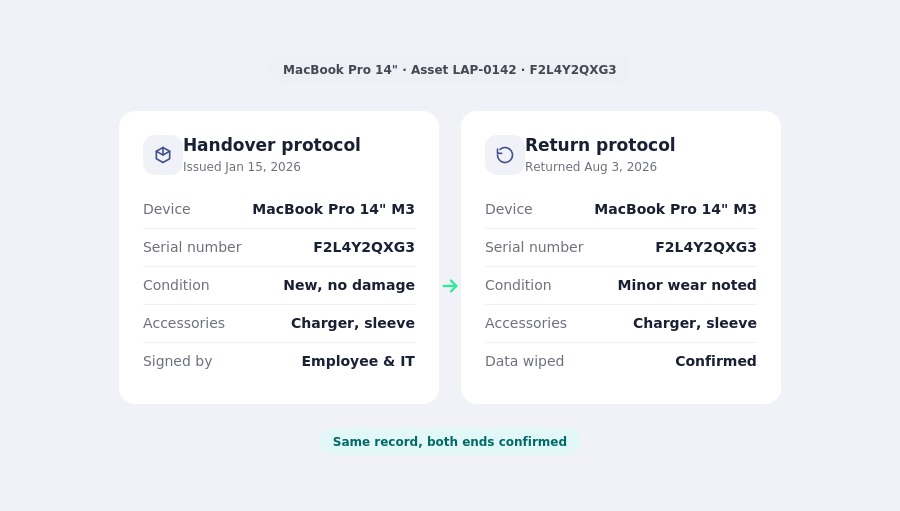
Every device issued to an employee should have a written protocol (in German, an Übergabeprotokoll) that captures:
- Device type, brand, and model
- Serial number and asset tag
- Condition at handover (new, refurbished, existing damage)
- Included accessories (charger, dock, mouse, headset)
- Date issued and signature from both employer and employee
- Scope of use (work only, or limited private use permitted)
This isn't paperwork for its own sake. It's the reference document that makes the return conversation simple instead of contested. Without it, disputes over "was this scratch already there" or "did I get a monitor" become genuinely hard to resolve.
What to Record at Return
The return side of the same protocol should confirm:
- Condition on return, compared against the handout record
- Confirmation that business data has been backed up or transferred
- Confirmation that the device has been wiped or reset (per your data policy)
- Removal from your MDM (Mobile Device Management) or asset inventory
- Date of return and signature confirming receipt
Companies that build the return checklist as a mirror of the handout checklist, using the same fields against the same record, spend far less time reconstructing what was issued in the first place.
The Handover Protocol: The Legal Layer Most Companies Skip
In Germany, company equipment (Arbeitsmittel) legally belongs to the employer at all times. Employees have no right of retention (Zurückbehaltungsrecht) over it, meaning they can't hold onto a laptop as leverage in a dispute, and return is due at the latest by the employment end date.
That legal clarity only helps you if you can prove what was issued. A signed handover protocol, covering both the handout and the return, is the document that turns "I think he has a laptop and a monitor" into an enforceable record. It should also cover:
- Whether private use of the device is permitted, and to what extent
- Liability for damage and the process for reporting it
- What happens to data on personally owned devices under a BYOD (Bring Your Own Device) policy, if you have one
None of this replaces legal advice for your specific situation. But treating the handover protocol as a standard part of onboarding, not an afterthought at offboarding, removes most of the ambiguity before it becomes a dispute.
What to Do When a Device Isn't Returned
Even with a clear process, some devices don't come back on the first request. A practical escalation path looks like this:
- Automated reminder at the return deadline. A polite, scheduled follow-up costs nothing and resolves most cases.
- A single named point of contact. Ambiguity about who owns the return, HR or IT, is one of the most common reasons devices go missing. Assign one person.
- Remote wipe and access revocation regardless of device status. Whether or not the hardware comes back, company data and access should be cut off on the agreed date. This is where MDM and cybersecurity tooling matter more than the hardware itself.
- A documented final step. If a device genuinely doesn't come back, you need a clear record of what was owed, when it was due, and what steps were taken. This protects you if the situation escalates further.
Companies with no structured process here tend to discover it during a crisis: a security incident, a departure on bad terms, or an audit that asks "where is this laptop." Building the escalation path in advance, as part of your standard IT support setup, means it's ready before it's needed.
Automating the Process So Nobody Has to Remember It
Manual handover tracking works at 10 people and starts breaking at 30. The fix isn't a stricter policy, it's removing the dependency on memory entirely.
deeploi builds device tracking into onboarding and offboarding as one continuous system rather than two separate checklists. When a new hire is confirmed, deeploi provisions the right device for their role, logs the handout record automatically, and enrolls it in device management from day one. Onboarding with deeploi typically takes 3 to 5 minutes instead of the 2 to 3 hours it takes to set up a new laptop manually. When that same person leaves, the same record triggers the return process: reminders go out automatically, the device is remotely secured regardless of whether the hardware has arrived back yet, and the asset inventory updates the moment it's returned.
This is the difference between a managed service and a spreadsheet: the record doesn't depend on someone remembering to update it. Companies using deeploi report up to 98% less IT workload on tasks like this, because the handover process runs itself instead of running through someone's inbox.
[Image: The deeploi dashboard showing a device's full lifecycle from handout to return]
What to Look for in a Device Tracking Approach
If you're deciding how to fix this in your own company, the right approach depends less on the tool and more on whether it covers the full lifecycle:
Excel and a shared drive can work at a handful of employees. The failure point isn't a specific headcount, it's the moment nobody can say with confidence who has what, and that moment tends to arrive faster than most companies expect.
Conclusion
A device handover process that only exists in someone's memory is not a process, it's a risk that hasn't surfaced yet. Writing it down, from the day a device is issued to the day it comes back, turns a source of quiet chaos into a two-minute lookup. deeploi handles this automatically, so your team never has to reconstruct who has what after the fact.
{{cta}}
FAQ
What should a device handover checklist include?
At minimum: device type, serial number, condition at handover, included accessories, date, and signatures from both employer and employee. The same fields should be checked again at return to make comparison straightforward.
What happens if an employee doesn't return company equipment?
Start with an automated reminder at the deadline, then escalate to a single named contact. Regardless of whether the hardware comes back, revoke access and remotely wipe the device on the agreed departure date to protect company data.
Is a device handover protocol legally required in Germany?
There's no blanket legal requirement, but it's strongly recommended. Since employees have no right of retention over company equipment, a signed protocol is the clearest way to prove what was issued and prevent disputes over condition or missing accessories.
How do you track company devices without a spreadsheet?
A managed IT platform can automatically log devices at handout, enroll them in MDM, and trigger the return process when an employee's exit date is confirmed, removing the manual update step entirely.
How long should a company wait before escalating an unreturned device?
Most structured processes send a reminder immediately at the deadline and escalate to a named contact within a few business days. Waiting longer than two weeks significantly lowers the chance of recovery, so early, consistent follow-up matters more than a strict policy.