.jpg)








Direct Answer
Endpoint management centralises the administration, security, and entire lifecycle of company devices while reducing manual IT work. For SMBs without a dedicated IT team, a managed solution like deeploi is particularly effective because it combines device management, security, automation, and hands-on IT support rather than adding another tool to the stack.
Key Takeaways
- Endpoint management centrally manages all devices: Laptops, smartphones, and tablets are controlled, secured, and kept up to date through a unified platform – rather than being configured individually and manually.
- Traditional tools assume IT expertise: Many platforms expect an IT admin to configure policies, prioritise patches, and oversee operations. Without that knowledge, features go unused.
- More tools rarely mean more control: Companies use an average of 5 to 15 different security and management tools in parallel. Each additional tool increases complexity – and makes it easier to miss security vulnerabilities.
- deeploi makes endpoint management possible without an IT department: As a managed service, deeploi takes over the entire device lifecycle – no need to hire an IT admin or worry about hidden costs.
Endpoint management: definition and benefits
Endpoint management describes the centralised administration, security, and maintenance of all company devices. This includes laptops, smartphones, tablets, and increasingly IoT devices. The goal of endpoint management is to control all endpoints through a unified platform, enforce security policies, and efficiently map the entire lifecycle of each device.
The core benefits of endpoint management at a glance:
- Central control: Manage all endpoints through a single pane of glass – no more juggling spreadsheets and point solutions.
- Endpoint security: Close security gaps through automated patch management, device encryption, and policy-based device control.
- Compliance management: Demonstrably meet GDPR requirements and regulatory standards such as the NIS2 directive.
- Time savings: Automate onboarding, offboarding, and software deployment – rather than investing hours in manual processes.
{{cta}}
The difference between MDM, EMM, and UEM
The discipline has evolved through several stages. It began with Mobile Device Management (MDM), which exclusively managed mobile devices such as smartphones and tablets. As complexity grew, Enterprise Mobility Management (EMM) emerged, extending the approach to include app management, content management, and identity management. The next logical step was Unified Endpoint Management (UEM): a single platform unifying all device classes – from desktops and mobile devices to connected endpoints.
Cloud-based solutions have accelerated this evolution by enabling location-independent management, making them especially indispensable for remote and hybrid working models.
The boundaries between these categories are increasingly blurring. Modern UEM platforms now cover what once required separate MDM and EMM solutions. For businesses, this means that instead of running three different tools, a single centralised endpoint management platform will ideally suffice.
Modern endpoint management solutions go a step further by leveraging automation to significantly reduce routine tasks. Patch management, software rollouts, and security updates run in the background without anyone needing to intervene manually. This is especially relevant for SMBs without their own IT department. Automation replaces the in-house expertise that is often missing – and ensures that endpoints are continuously secured.
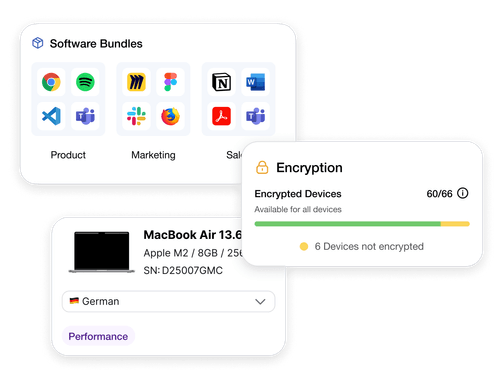
This is precisely the principle deeploi is built on: standardised, automated IT processes, complemented by personal support whenever a decision needs to be made.
The limitations of traditional endpoint management tools
Traditional UEM platforms such as Microsoft Intune or ManageEngine are powerful tools: they cover remote monitoring and management, enable configuration management, offer patch management, and provide centralised inventory of all endpoints. But what looks like a complete solution on paper has clear limitations in practice – especially for SMBs with limited IT capacity or no IT department at all.

Procurement and offboarding are entirely missing
Traditional endpoint management tools only kick in once a device has already been delivered to an employee and enrolled in the MDM. What happens before and after that is simply not covered by the platform.
Yet a significant portion of the operational workload sits precisely here:
- Procuring, pre-configuring, and shipping devices
- Involving employees during onboarding
- Retrieving, resetting, and reassigning devices when employees leave
- Properly revoking and documenting access
Without an experienced IT admin, the potential goes untapped
Traditional endpoint management tools assume that an experienced IT admin configures policies, prioritises patches, evaluates security vulnerabilities, and manages day-to-day operations. Without that expertise, even the best features go unused:
- Patch management: Updates are available but never scheduled, prioritised, or checked for compatibility.
- Configuration management: Security policies exist as templates but are never customised to the company's specific needs.
- Remote monitoring and management: Dashboards display warnings, but no one responds to them in time.
- Inventory: Device lists are theoretically available but are never maintained and quickly become outdated.
The result: companies pay for features they don't use. The underlying IT problems – outdated operating systems, missing encryption, uncontrolled access – remain unresolved.
Why adding more software doesn't solve the problem
The instinct many companies have is understandable: if one tool isn't enough, add another. A separate tool for endpoint security, one for software deployment, one for remote management. But every additional tool increases the administrative burden rather than reducing it. Fragmentation grows – and with it, the likelihood that security gaps go unnoticed.
For "accidental IT owners" – people managers, ops leads, or founders handling IT on the side – this situation quickly becomes untenable. This is precisely the structural problem with traditional endpoint management tools. The question isn't whether a tool supports patch management or configuration management – it's whether anyone in the organisation has the capacity to operate, monitor, and evolve those functions on an ongoing basis.
For companies where the answer is "no", deeploi offers a different path. Rather than providing individual tools, deeploi takes over the entire IT operation as a managed service: inventory, patch management, remote monitoring and management, and configuration management included.

Endpoint management for SMBs: self-service tool or complete IT solution?
The choice between a traditional endpoint management tool and an all-in-one IT solution depends on specific factors. Before deciding on a solution, it's worth taking an honest look at your starting point. The checklist below will help you assess your situation.
Ask yourself the following questions:
- Do you have a dedicated IT admin who can spend at least 50% of their working time on endpoint management?
- Does that person have expertise in MDM configuration, patch prioritisation, and security policies?
- Do you have the capacity to manually configure BYOD devices and cross-platform management of Windows, macOS, and iOS?
- Can you accommodate 2+ hours of manual IT work per person for the onboarding process for new employees?
- Are you prepared to implement and document compliance requirements such as GDPR, NIS2, and ISO 27001 yourself?
- Are community forums or paid premium support with long response times sufficient for your needs?
- Can you budget for additional expenses beyond licensing costs – such as admin salaries, training, and external consultants?
If you answered "no" to one or more of these questions, a traditional self-service tool is probably not the right choice. A managed service like deeploi handles exactly these tasks for you – without requiring you to build in-house IT expertise or allocate additional resources.
deeploi: the IT solution that truly takes the load off your team
Traditional endpoint management tools deliver software that needs to be configured and operated. deeploi goes a step further and takes over the entire device lifecycle as IT-as-a-service. Rather than handing you tools to work with, a team of IT experts – supported by a modern platform – handles configuration, patches, procurement, and offboarding.
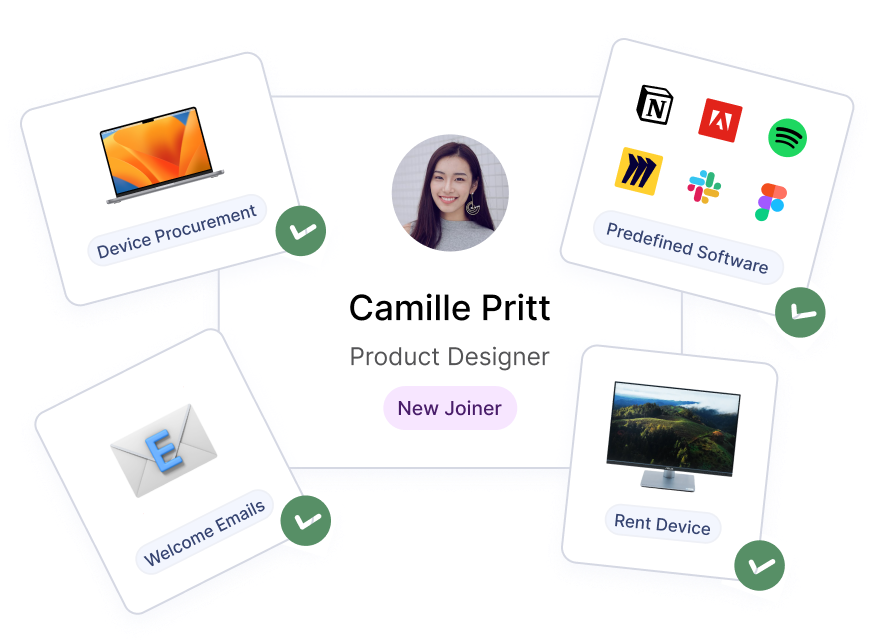
The key components at a glance:
✓ Procurement and provisioning: deeploi coordinates device ordering and handles full configuration. Employees receive ready-to-use devices with pre-installed apps and access credentials. Thanks to zero-touch deployment, manual IT setup is eliminated entirely. As an official Apple Partner, deeploi also ensures fast availability and direct manufacturer support for Apple devices.
✓ HR integration: deeploi syncs with HR systems such as Personio, Factorial, HiBob, and BambooHR. When a new person joins the company, their device, software, and access are provisioned automatically. When they leave, everything is revoked just as automatically. Learn more about automated onboarding.
✓ Endpoint security and compliance: Automated patch management, device encryption, and policy-based device control ensure GDPR compliance – without you having to manage the details.
✓ IT support with fast response times: When an issue does arise, the deeploi support team responds in an average of 12 minutes.
✓ Remote lock and wipe: If a device is lost or stolen, it can be immediately locked or wiped remotely. Sensitive data stays protected, and GDPR notification obligations are met.

Endpoint management solutions compared: deeploi vs. traditional tools
The differences between a traditional endpoint management tool and deeploi become especially clear in day-to-day use. The overview below shows exactly where the two approaches diverge.
Who is deeploi suited for as an IT solution?
deeploi is designed for businesses that need professional device lifecycle management but don't want – or aren't able – to build their own IT department. Typical use cases:
Founders and CEOs: You want to focus on growth, not patch management and device procurement. deeploi takes the operational IT burden off your plate while simultaneously reducing security risks.
HR managers: Onboarding and offboarding are part of your daily work. Instead of spending hours setting up devices and manually managing access, the IT side runs automatically via HR integration with Personio.
IT teams and IT admins: You have the expertise but not the time for repetitive routine tasks. deeploi automates exactly those tasks and gives you back the capacity to focus on more strategic IT projects.
The key point: the platform is designed to be intuitive for both IT admins and non-IT professionals – no steep learning curve, no complex setup. And for anything beyond that, an experienced support team is there for you.
{{quote}}
Why over 200 companies rely on deeploi: numbers speak louder than promises. Time savings compared to manual IT processes reach up to 95%. These aren't theoretical figures – they're results from the day-to-day reality of over 200 companies across various industries and sizes in the DACH region.
{{cta}}
Conclusion: fewer tools, more control with a modern endpoint management solution
Traditional endpoint management software solves partial problems. It covers remote management or offers inventory tracking. But it doesn't replace the person who orchestrates, monitors, and evolves all those functions. deeploi does exactly that. It's not another piece of software in your tool stack – it's a complete IT service that combines automation with human expertise.
Instead of running five different tools for endpoint security, software deployment, compliance reporting, and IT support, you get a single solution. One platform, one point of contact, one transparent price. And the confidence that your IT is running in the background while you focus on your core business.
Ready to reduce your IT overhead by up to 95%?
FAQ
What is the difference between MDM, EMM, and UEM?
MDM (Mobile Device Management) exclusively manages mobile devices such as smartphones and tablets. EMM expands this approach to include app and content management as well as access control. UEM (Unified Endpoint Management) goes even further, unifying all device classes – from desktops and mobile devices to IoT endpoints – within a single central console.
Which endpoint management solution is right for SMBs without an IT department?
Traditional UEM tools assume that an experienced IT admin configures policies and manages operations. For SMBs without in-house IT expertise, a managed service approach is far better suited. deeploi takes over configuration, ongoing operations, and support entirely – so your team can focus on its core business.
What happens to devices during offboarding without professional endpoint management?
Without structured offboarding, access remains active and sensitive data stays stored on devices. This is a significant data protection risk – particularly in relation to notification obligations under GDPR Art. 33 and Art. 34. Professional solutions such as remote lock and wipe, combined with a documented offboarding process, reliably protect personal data.
Do I need endpoint management for remote and hybrid teams too?
Yes – professional endpoint management is especially essential for remote teams. Devices operate outside the corporate network and are more exposed to risk. Features such as zero-touch provisioning and remote configuration work entirely independently of location. This keeps all endpoints securely managed, whether your team is working in the office, at home, or on the go.