.jpg)








Direct Answer
Automated app provisioning ensures new employees have all the tools, access rights, and security configurations they need from day one, instead of waiting hours for manual IT setup. With deeploi, HR integrations, role-based software bundles, and device configuration work together to complete IT onboarding in around 3–5 minutes.
Key Takeaways
- Productivity from day one: New employees need immediate access on their first working day to all relevant apps and tools – from email and communication platforms to role-specific software.
- Manual processes waste valuable time: Setting up software access manually is error-prone, time-consuming, and does not scale with company growth.
- Automation ensures consistent setups: Predefined software packages per role or team eliminate manual steps and create a consistent onboarding process.
- deeploi fully automates IT onboarding: Apps and access rights are provisioned automatically, reducing IT onboarding time to just 3–5 minutes instead of 2–3 hours.
How to successfully automate app provisioning for new employees during onboarding
What happens when a new team member opens their laptop on the first day and stares at an empty desktop? No Slack, no email address, no access to the project management tool. The result: IT is buried in tickets, HR loses oversight, and new employees sit idle. Manual setup takes 2–3 hours per person. With the right strategy and a platform like deeploi, automatic app provisioning for employees during onboarding can be fully automated. New team members become productive in minutes instead of hours.
What conditions must be met for a perfect first working day?
The first working day sets the tone for the entire collaboration. A structured onboarding process significantly increases employee retention and helps new team members become productive faster. To ensure new employees can get started immediately on day one, two key conditions must be met:
1. All devices are ready to use: Laptop, monitor, and accessories should be fully configured and either set up at the workplace or ready for shipping. No waiting for deliveries, no manual setup on the first day. deeploi delivers preconfigured devices directly to new team members via zero-touch provisioning – whether to the office or to a home office.
2. All apps and access rights are set up: Email account, workspace (Google Workspace or Microsoft 365), communication tools such as Slack or Teams, project management software, and role-specific applications must be fully functional and equipped with the correct permissions. The new team member logs in and can start working immediately.
When these foundations are in place, HR can focus entirely on the human side of onboarding: team building, company culture, and professional training for new employees.
Apps ready before the first working day begins. No more manual setup: With deeploi, new team members are productive within 5 minutes.
Which apps and access rights new employees need on day one
The onboarding apps and software access rights that new employees need can be divided into two categories: universal core tools that everyone in the company requires, and role-specific applications depending on department and responsibilities. Ideally, both categories should be set up and ready to use before the first working day.
.png)
Core tools for all employees
Regardless of role or department, there is a set of tools that every new team member needs from day one. These onboarding apps form the foundation for communication, collaboration, and access to company systems.
These tools are the backbone of daily collaboration. Without them, productive work on the first working day is simply not possible. If even one access right is missing, questions and delays arise immediately.
Role-specific software by department
In addition to core tools, new team members need access to software tailored specifically to their responsibilities and department. These role-specific applications vary significantly depending on the position.
It is precisely this combination of core and role-specific tools that makes manual provisioning so error-prone and time-consuming. With deeploi, predefined software bundles can be created for each team or role and automatically assigned during onboarding. This ensures that new employees start with exactly the apps they need for their training and daily work.
.png)
Why manual app provisioning in onboarding often fails
Many HR and operations managers know this scenario: A new team member starts, but essential tools are missing on the laptop. The email account is not set up, licenses have not been assigned, and the password manager was forgotten. Someone from the team has to step in, create tickets, and fix everything manually. This not only wastes valuable time but also leaves a poor first impression on new employees.
- Forgotten access rights: Without a standardized onboarding process, tools or licenses are regularly overlooked, especially role-specific software that is not included in every checklist.
- Time loss for IT and HR: Manual setup takes 2–3 hours per person. With several new hires per month, this adds up quickly and ties up resources that are needed elsewhere.
- Inconsistent setups: Everyone configures differently. The result is different software versions, missing security configurations, and a lack of standardization across teams.
- Security risks: Without automated policies, password managers, device encryption, or up-to-date patches are often missing. This creates an open door for cyberattacks and compliance violations.
- Scalability issues: What works with 10 employees turns into chaos at 50 or 100. Manual processes do not scale with company growth.
- Frustration among new team members: Anyone who cannot work on their first day starts off demotivated. This measurably harms employee retention and, in the worst case, can lead to early resignations.
Manual app provisioning is not a scalable approach for the onboarding process. Companies that want to grow need an automated process that works reliably, consistently, and securely – regardless of whether five or fifty new team members start each month. This is exactly where automated device management comes in.
What are the benefits of automatic software provisioning during onboarding with deeploi?
deeploi transforms automatic app provisioning for employees during onboarding from a manual effort into a standardized, automated process. The platform connects existing HR systems, workspace setup, software deployment, and security configuration into a single workflow. The result is a structured onboarding process that works reliably and scales with your company.
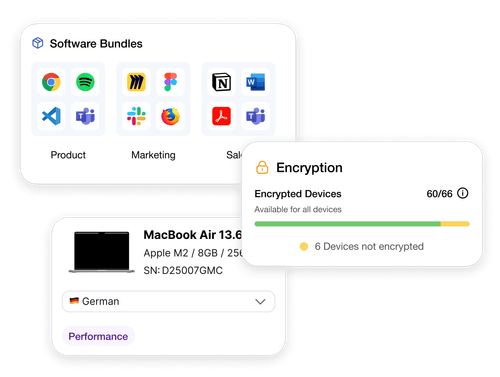
- Up to 98 % less IT effort: Instead of spending 2–3 hours per onboarding, the entire IT provisioning process with deeploi takes just 3–5 minutes. HR teams and IT gain valuable time for strategic tasks instead of setting up access manually.
- Predefined software bundles per role: App packages are configured once for each team and then automatically assigned during every onboarding. For example, the marketing team receives HubSpot and Canva, while development gets GitHub and Jira. Forgotten tools or manual rework become a thing of the past.
- Seamless HR integration: deeploi syncs with HR systems such as Personio. As soon as a new employee is created in the system, the automated onboarding process including app provisioning starts automatically. No duplicate data entry required.
- Consistent, error-free setups: Every new employee receives the exact same standardized configuration. No missing onboarding apps, incorrect permissions, or outdated software versions.
- Automatic security configuration: Password policies, device encryption, and security updates are enforced automatically. All data is protected from the first login. No security gaps caused by manual oversights.
- Perfect for remote teams: Hardware is shipped preconfigured to the employee’s home address. All apps install automatically on first startup. No on-site IT support required, regardless of whether new team members work remotely or at another location.
More than 200 companies already rely on deeploi to accelerate their onboarding process. Instaffo was able to eliminate 97 % of manual IT effort with deeploi, and at HOLY Energy, onboarding new employees now takes just 5 minutes.
Find out what deeploi can do for your team.
How automatic app provisioning works with deeploi
The entire process is intentionally designed so that you do not need IT expertise. deeploi was built for “accidental IT owners” – HR managers, office managers, or founders who take on IT responsibilities alongside their core roles. In four simple steps, onboarding new employees is fully automated.
.png)
1. Set up HR system integration: deeploi connects to your existing HR system, for example Personio or BambooHR. As soon as a new employee is created there, deeploi automatically detects this and starts the onboarding workflow. No duplicate data entry and no manual notification to IT required.
2. Define software bundles per team: You define once which onboarding apps each team requires. Example: The marketing team is automatically assigned HubSpot, Canva, and Google Analytics. These bundles can be adjusted at any time if tools or requirements change.
3. Select and assign hardware: Choose a device from your existing inventory or order or lease a new one directly through the deeploi platform. The device is preconfigured via zero-touch provisioning. All defined apps are installed automatically without any manual intervention.
4. Approve the setup, deeploi handles the rest: After approval, deeploi manages the entire process – creating the workspace account, setting up SaaS access, enforcing security policies, and shipping the device to the workplace or directly to the employee’s home address.
The result: New team members power on their device, log in, and find all tools ready to use immediately. No manual downloads, no waiting for IT support, and no frustration on the first working day. After the start, updates and patches continue to run automatically in the background, ensuring all devices remain up to date and secure at all times.
Automatically provision apps during onboarding with deeploi. Find out how you can reduce the time spent on app provisioning during onboarding by up to 98 % with deeploi.
Conclusion: Automatically provision all apps during onboarding with deeploi
Automatic app provisioning for employees during onboarding has long become a necessity for growing companies. Manual processes waste valuable time, create errors, and frustrate new team members on their very first working day. Automation enables consistent, secure, and scalable onboarding processes that lay the foundation for long-term employee retention and productivity.
As an all-in-one IT platform, deeploi covers the entire IT onboarding process: from integration with existing HR systems such as Personio, to predefined software bundles per role, to automatic device setup via zero-touch provisioning. The result: 5 minutes instead of 2–3 hours per onboarding and around 95 % less IT effort, with no last-minute stress before a new team member’s first day.
FAQ
Which apps and access rights should be automatically available on the first working day?
At a minimum: email, calendar, communication tools such as Slack or Teams, document management, password manager, and HR portal. In addition, role-specific software depending on the department. With deeploi, you define predefined software bundles per role that are automatically installed during onboarding.
How much time does automatic app provisioning save compared to manual processes?
Manual IT onboarding takes an average of 2–3 hours per person. With deeploi, the effort is reduced to 3–5 minutes. This corresponds to time savings of more than 95 %. With multiple new hires per month, this saves dozens of working hours.
What risks arise if apps for new employees are provisioned manually?
Forgotten access rights, inconsistent configurations, missing security updates, and compliance violations are among the most common risks. In addition, new team members may feel frustrated if they cannot start working immediately on their first day. Automation reliably eliminates these sources of error.
Can automatic app provisioning also be used for remote employees?
Yes, deeploi is ideal for remote onboarding. Hardware is preconfigured and shipped directly to the employee’s home address. All apps install automatically on first startup, without any on-site IT support. If questions arise, deeploi’s unlimited IT service support is available remotely.



