








Direct Answer
On-premise or cloud? For most SMBs, the answer is clear: cloud. You avoid expensive hardware, scale without infrastructure projects, and shift maintenance to the provider. The harder question is what comes next: who actually manages your devices, access, security, and onboarding once your IT is in the cloud?
Key Takeaways
- On-premise or cloud is not a pure IT question: it's a business decision, and in growing SMBs it usually gets made by someone who is not in IT at all.
- For most growing SMBs, more speaks for the cloud: costs stay predictable, the infrastructure scales up with you instantly, and the maintenance effort sits with the provider.
- On-premise only pays off in specific exceptions: strict data sovereignty, non-cloud-capable legacy systems, or a dedicated, specialized in-house IT team.
- Choosing the cloud doesn't settle who operates it: a platform like deeploi takes over management, onboarding, and support, even without an in-house IT team.
On-premise or cloud? It sounds like an IT decision, but it isn't. The person who makes it usually doesn't sit in the IT department. They sit in management, in the HR team, or somewhere in between, with a laptop, a growing headcount, and too little time to spend days working through server architecture. Find out who on-premise still makes sense for, and which path really fits your company.
What on-premise means and what cloud means
The two models differ above all in where your IT lives and who looks after it.
On-premise: hardware, software, and data run inside your own company on your own servers. You buy the IT infrastructure, operate it yourself, and are responsible for maintenance, updates, and security. Everything is in your hands, and on your invoice.
Cloud: IT resources run at an external provider, for example Microsoft Azure, AWS, or Google Cloud. You access them over the internet and pay for what you use (monthly operating costs instead of a one-off investment). The provider takes care of the technology, updates, and the security of the data centers.
Important: we're not talking about individual programs like Google Workspace or Slack here, but about the IT infrastructure underneath. In other words, the question of how devices, data, and systems in your company are managed at a fundamental level.
The comparison at a glance: 5 criteria that really count
Whether on-premise or cloud fits better comes down to five criteria. We compare both models point by point.
1. Costs
On-premise means high acquisition costs: servers, licenses, network infrastructure. On top come ongoing maintenance costs, power costs, and, often underestimated, staffing costs for running IT. The model is capital-intensive and hard to plan.
The cloud works on the OpEx principle: predictable monthly costs, no hardware investments, no depreciation. Scaling up or down without buying anything new.
In practice: if you don't have your own IT team, on-premise makes you pay twice: for the technology and for the external service providers who maintain it. That quickly turns the seemingly cheaper hardware into the most expensive option.
2. Scalability
On-premise: at some point, growth hits the capacity limits of your servers. More mailboxes, more storage, more simultaneous access means new hardware, with several weeks of lead time and an up-front investment. On top of that, you need someone to plan and set up the expansion.
Cloud: storage, mailboxes, and licenses can be scaled in minutes. Capacity planning and hardware lead times disappear.
In practice: you'll need a laptop either way. The cloud takes the server planning off your plate, not the device procurement. That's exactly why, even in the cloud, you still need someone to order, set up, and manage devices.
3. Security and data protection
On-premise gives you maximum control, on paper. In reality, the entire responsibility for security, patches, and access management sits with you. Without your own security team, that means: nobody is actively taking care of it.
Cloud: large providers invest more in security infrastructure than any SMB ever could. ISO 27001 certifications, SOC 2 audits, and GDPR-compliant data storage in German or European data centers are standard.
In practice: data control with on-premise is an illusion if nobody in the company actively runs IT security. The question is not whether you want control, but whether you have the capacity to exercise that control responsibly.
4. Maintenance and internal effort
On-premise: updates, patches, backups, and hardware failures are handled in-house, and it all often hangs on a single person in the company. If that person is out or resigns, IT grinds to a halt.
Cloud: maintenance sits with the provider and updates run automatically. There's no internal effort to keep the infrastructure running.
In practice: the accidental IT owner already spends too much time on IT. That's the person who actually does something else but looks after IT on the side. On-premise multiplies exactly this problem.
5. Location independence and remote work
On-premise: external access runs over a VPN. It's complex to set up, prone to outages, and needs constant maintenance.
Cloud: access works from anywhere, with no extra setup. You don't need a VPN or your own infrastructure for it.
In practice: remote-first and hybrid teams stopped being a special case long ago. They're the norm. On-premise creates structural friction here that costs time every day.
Who is on-premise still right for?
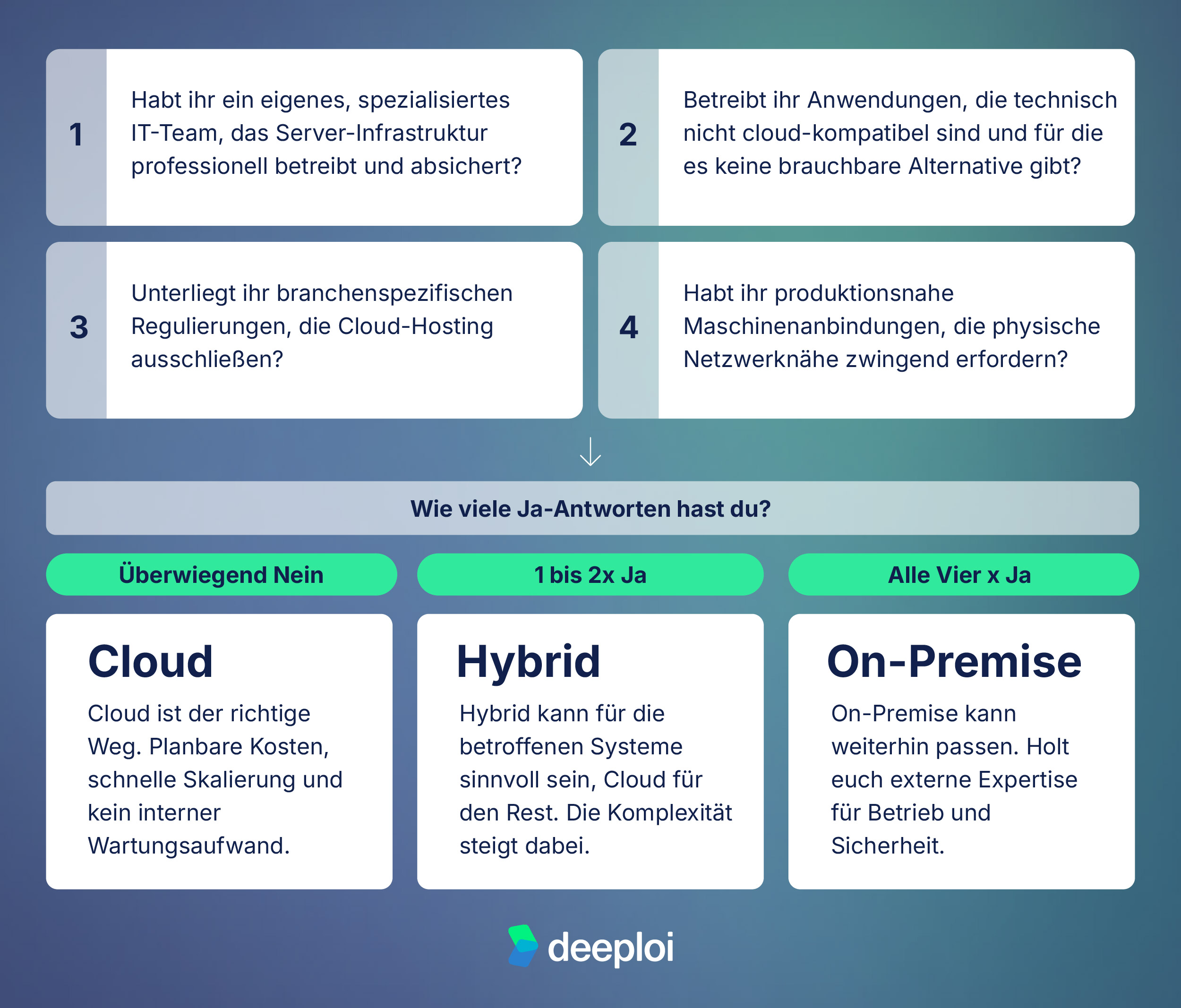
On-premise is not an outdated concept, but it fits a specific type of company. Check honestly whether you fall into one of these exceptions:
- Highly regulated industries with strict data sovereignty requirements, for example certain areas of healthcare, defense, or public administration, where cloud hosting is ruled out by regulation.
- Legacy line-of-business applications that are technically not cloud-compatible and for which there is no usable alternative, such as specialized ERP systems deeply integrated into production processes.
- Production-level machine connections where physical network proximity is technically unavoidable.
- Companies with a dedicated, specialized IT team large enough to operate, secure, and develop infrastructure professionally.
If you don't recognize your company in any of these points, the decision is clear: the cloud is the right path.
Quick check: does on-premise still fit your company?
Answer these four questions with yes or no, then count your yes answers.
Cloud decided, operations open: three paths for SMBs
Deciding for the cloud solves the infrastructure question. But it doesn't yet answer a second one: who manages the cloud environment? Who provisions devices, rolls out software, assigns access, onboards new employees, and offboards them securely when they leave the company?
That's exactly the next operational challenge for SMBs without their own IT team. And it has three classic answers:
- Build your own IT team: expensive, slow, with a steep ramp-up.
- Classic MSP (managed service provider): often inflexible, reactive, with opaque cost structures.
- An IT platform like deeploi, which automates exactly this: scalable, predictable, with no dependency on individual people.
Manage your cloud environment effortlessly with deeploi
With deeploi, everything runs cloud-based and from a single source. Instead of spreading IT across several roles or coordinating an MSP, we bundle the entire IT operation in one place.
As an all-in-one IT platform for SMBs, deeploi takes over device management, MDM, on- and offboarding, software provisioning, patch management, and IT support. You don't need to build or expand your own IT team for it.
- Per-user price per month, no hidden fees, no surcharge for setup or tickets.
- Hardware and hands-on help despite the cloud. deeploi coordinates device procurement through partners and arranges on-site support for physical problems.
- IT support responds in 12 minutes on average (against a 30-minute SLA).
- Support in German and English.
- ISO 27001 certified, GDPR compliant.
What does that mean in practice? deeploi reduces manual IT effort by up to 80% and cuts IT costs by up to 75% compared to classic MSPs. Onboardings that used to take hours now run automatically in minutes.
{{cta}}
Conclusion: the cloud is the right choice for most SMBs
The choice between on-premise and cloud is not a technical detail. It's a strategic call for the whole company. For most growing SMBs, it comes out clearly: the cloud keeps costs predictable, grows with you without lead time, and takes maintenance off your plate. On-premise stays sensible, but only in narrow exceptions like strict data sovereignty, non-cloud-capable systems, or a dedicated, specialized IT team.
With the decision for the cloud, though, the more important part is still open: who runs the environment day to day? A platform like deeploi takes over that job, from device management to onboarding to support, even without an in-house IT team. That way your infrastructure stays not only modern, but also reliably looked after.
FAQ
When is on-premise still worth it for SMBs without an IT team?
Almost never. On-premise requires in-house know-how for operation, security, and maintenance. Without your own IT team, you get a high risk of outages, hidden costs for external service providers, and a dangerous dependency on individual people in the company. Exceptions exist, but they're narrow: highly regulated industries, non-cloud-capable legacy systems, or production-level machine connections. See our guide on IT security for small businesses without an IT department.
Is the cloud more secure than your own server for SMBs?
In most cases, yes, provided you choose a reputable, certified provider. Large cloud providers invest more in security infrastructure than an SMB could ever build: dedicated security teams, automated patch processes, physically secured data centers. The decisive question is not "cloud or on-premise?", but: who actively takes responsibility for your IT security?
What's the difference between cloud infrastructure and cloud management?
Cloud infrastructure describes where IT resources run, in external data centers instead of on your own servers. Cloud management describes who actively operates that infrastructure: manages devices, rolls out software, assigns access, and provides support. Both need an answer. The first question solves the infrastructure decision, the second the operational one.
How do you manage a cloud infrastructure without your own IT team?
With an IT management platform like deeploi, which takes over device management, onboarding, software provisioning, patch management, and IT support for SMBs, without your own IT department. It replaces the classic MSP with a scalable, automated setup with predictable costs.
What does hybrid IT mean for small companies?
Hybrid IT combines cloud and on-premise. For SMBs without an IT team, it only makes sense if individual systems genuinely can't go to the cloud for technical reasons, for example a specialized machine control or an outdated industry application. Everything else should run in the cloud. Hybrid increases complexity and requires external IT support for the on-premise part.