









Direct Answer
Somewhere between employee ten and fifty, ad-hoc IT starts becoming expensive. Password resets, laptop setup, access requests and security tasks eat into time that people should spend on their actual jobs. The question isn't whether you've reached a magic headcount, but whether these warning signs are already costing you money. Before hiring a full-time IT admin, automate the repetitive work and see how much complexity actually remains.
Key Takeaways
Watch the signs, not the headcount. Slow onboarding, untracked devices, security gaps, and an overwhelmed "accidental IT owner" signal it's time to act.
Most IT work is repeatable. Provisioning, offboarding, patching, and access management are rules-based tasks you can automate before hiring anyone.
Automate, outsource, or hire. Automation fits cloud-first teams; an MSP fits custom infrastructure; a full-time admin fits businesses where IT is core.
A platform can cover the routine 80%, support included. deeploi automates the IT lifecycle and adds real human helpdesk support, letting many 30-300 person companies delay or skip the hire.
Somewhere between employee ten and employee fifty, every growing company hits the same wall. The office manager who "handles IT" is spending half the week resetting passwords. The technical co-founder is configuring laptops instead of building the product. Or worse, nobody owns IT at all, and new starters wait days for the tools they need.
If that sounds familiar, this article is for you. We're not going to give you a magic headcount number that triggers a hire. Instead, we'll walk through the concrete warning signs that ad-hoc IT is costing real money, what a first IT admin actually does (and costs) in the DACH market, and the alternatives you should evaluate before committing to a full-time salary.
What are the warning signs that ad-hoc IT is costing you money?
The tipping point rarely arrives as a single dramatic failure. It shows up as a pattern of small losses that compound week after week. Watch for these signals.
- Slow onboarding and offboarding. New hires wait two or three days for accounts, devices, and software. Departing employees keep access to company systems long after their last day. Both scenarios cost time and create security exposure. If your onboarding process still relies on a shared checklist in a spreadsheet, you're probably losing hours per new starter.
- Unknown devices and licenses. Nobody can say exactly how many laptops the company owns, which SaaS subscriptions are active, or who has admin rights. Without proper IT documentation, you're paying for tools nobody uses and missing devices that carry company data.
- Missing security controls. Disk encryption isn't enforced. Multi-factor authentication is optional. Patch updates happen "when someone remembers." These gaps don't feel urgent until a breach makes them very expensive.
- Mounting support requests. Colleagues message the same person with every Wi-Fi issue, printer jam, and password reset. That person's actual job suffers, and response times stretch. Research from HappySignals shows employees lose an average of 3.22 hours of productivity per IT incident while waiting for resolution (Unthread).
These aren't just annoyances. They're measurable costs: lost productive hours, uncontrolled license spend, and risk exposure that grows with every new employee.
What does a first IT admin actually do?
Before you open a job requisition, it helps to understand the scope you're trying to fill. A typical first IT admin in a growing SMB covers five overlapping areas.
- Helpdesk and support. Fielding day-to-day requests, troubleshooting hardware and software issues, resetting accounts.
- Device management. Provisioning laptops, enforcing security policies, tracking inventory, handling repairs and replacements.
- Security and access control. Managing user permissions, enforcing MFA and encryption, running cybersecurity baselines, and responding to incidents.
- Software and license management. Procuring, deploying, and auditing SaaS subscriptions; removing unused licenses.
- IT strategy and vendor management. Evaluating tools, negotiating contracts, planning infrastructure as the company scales.
However, one generalist rarely covers all five areas well. Most of the day gets consumed by reactive support and repetitive provisioning tasks, leaving almost no time for strategy or security improvements. And much of that day-to-day work (account creation, device configuration, access reviews) is rules-based and repeatable, which means it can be automated.
What does a first IT admin cost in the DACH market?
In Germany, Austria, and Switzerland, a junior to mid-level IT administrator typically earns between €45,000 and €65,000 gross per year, depending on the city and experience level. Senior profiles in Munich or Zurich can reach €75,000 or more.
But salary is only the starting point. Factor in the hidden costs.
- Tooling overhead. Your new admin needs an endpoint management suite, a ticketing system, and security tooling. Budget roughly €5,000 to €15,000 per year for a basic stack.
- Recruiting time. IT talent in DACH is competitive. Expect four to twelve weeks to fill the role, during which ad-hoc IT continues to burn hours.
- Ramp-up. Even an experienced admin needs one to two months to learn your environment, integrations, and vendor relationships.
- Single point of failure. One person means zero coverage during holidays, sick days, or resignation. When that person is out, the company is back to square one.
Altogether, the true first-year cost of a dedicated IT hire often lands between €60,000 and €90,000 when you add employer contributions, tooling, and recruiting fees. For SMBs comparing IT support costs, that figure deserves scrutiny, especially when alternatives exist.
Automate, outsource, or hire: a simple decision framework
Instead of defaulting to a hire, start by asking which parts of IT actually require a human sitting in your office. The repeatable workflows that consume most of an admin's week (provisioning accounts, configuring devices, revoking access, patching endpoints) can be automated today. That changes the math on all three options.
Use this checklist to find your starting point.
- Mostly standard cloud tools, fewer than 200 employees, no custom on-prem infrastructure? Start with automation.
- Some on-site hardware, industry-specific compliance requirements, or need for hands-on support? Consider a managed service provider.
- IT complexity is core to the product or business model, or regulatory scale demands in-house ownership? Hire.
Many companies benefit from a combination. Automate the repeatable 80%, then decide whether the remaining 20% justifies a full-time salary or an MSP contract.
When an IT automation platform is enough
If your company runs a cloud-first stack (Google Workspace or Microsoft 365, a handful of SaaS tools, company-managed laptops), most of the daily IT workload follows predictable patterns. A new employee joins: create accounts, assign licenses, ship a configured laptop, enroll the device in security policies. Someone leaves: revoke access, wipe the device, recover licenses.
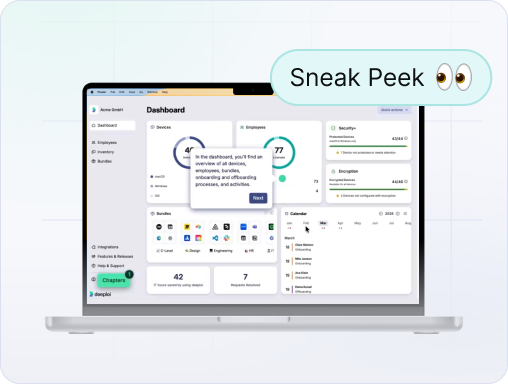
This is exactly the work an all-in-one IT platform built for SMBs is designed to absorb. deeploi, for example, connects your HR system (Personio, BambooHR, HiBob, Factorial, etc.) directly to IT provisioning, so creating a new hire in your HR tool triggers the entire onboarding chain automatically: workspace account, role-based software bundle, a preconfigured laptop shipped ready-to-use, and security policies enforced from first login. What used to take 2-3 hours per person drops to 3–5 minutes. Offboarding runs the same way in reverse: licenses reclaimed, accounts deactivated, data transferred, device remotely locked.
But the reason a platform can actually replace a first hire, rather than just assist one, is that the best options don't stop at automation. They also cover the two jobs you'd otherwise need a person for: support and security. With deeploi, device management, patch management, encryption, and cybersecurity baselines (endpoint protection, backup, ISO 27001-grade controls) run in the background, and every support request is handled by real IT experts with a 12-minute average response time and unlimited, flat-rate tickets. That's the entire "helpdesk half of the job" we described earlier, handled without a headcount.
The results bear this out. The Female Company cut IT time by 97% (from roughly 30 hours a month to under an hour) and IT costs by 62% after handing the work to deeploi. HOLY Energy, which previously had no IT structure at all, now runs onboarding in 5 minutes. Across 200+ SMBs, this model reports up to 75% lower cost than a traditional MSP.
For many companies between 10 and 100 employees, this either eliminates the need for a dedicated IT admin entirely or delays the hire by a year or more, while giving you better coverage than one generalist could, since there's no single point of failure when someone's on holiday.
When you need a managed service provider
Managed service providers (MSPs) make sense when your environment includes custom infrastructure, on-premise servers, or industry-specific compliance that requires hands-on expertise. An MSP gives you access to a team rather than a single person, which solves the coverage problem. The downside is less control: response times depend on the provider's SLA, and you're sharing their attention with other clients.
When you need a dedicated hire
A full-time IT admin becomes the right call when IT complexity is central to your business, not just operational overhead. Think companies building physical products with networked factory equipment, regulated industries requiring an in-house data protection officer, or businesses scaling past 150 employees where IT strategy needs a dedicated owner. Even then, automating the routine work first means your admin spends time on high-value problems instead of password resets.
FAQ
How many employees before a company needs an IT admin?
There's no universal threshold. A 30-person company with a messy SaaS stack and no security controls may need help sooner than a 60-person team with clean processes. Focus on the warning signs: if onboarding takes days, devices are untracked, or one person is drowning in support requests, you've already passed the tipping point.
Which IT processes should a growing company automate first?
Prioritize by frequency and risk. User lifecycle management (onboarding and offboarding) sits at the top because it happens with every hire and departure, and mistakes create immediate security gaps. Next, tackle device enrollment and patching, then software license provisioning and access reviews. These workflows are high-volume, rules-based, and deliver the fastest return on automation.
How does an IT management platform compare to hiring an IT admin?
A platform like deeploi covers the repeatable, rules-based work that fills most of an admin's week: provisioning, device management, patching, and security baselines, but it also includes the two things pure software leaves out: cybersecurity and a real human helpdesk (12-minute average response, staffed by IT experts, unlimited tickets on a flat rate). Unlike a single hire, it doesn't take sick days or resign, and unlike a traditional MSP, pricing is transparent and response is proactive. The real question becomes whether your remaining strategic and custom IT work justifies a €60,000+ salary, or whether a platform, occasionally topped up with an MSP, is the smarter investment for now.
Act on warning signs, not headcount targets
The right moment to fix your IT isn't when you hit 50 employees. It's when the warning signs start appearing: slow onboarding, shadow IT, security blind spots, and a team member whose real job is suffering because they've become the unofficial helpdesk. Recognizing those signals early gives you the chance to automate first, which solves the immediate pain and buys time for a more informed hiring decision. Start with the repeatable workflows, get visibility over your devices and licenses, and let the remaining complexity guide whether you need a provider, a platform, or a person.-



%25402x.png)

