







Direct Answer
MFA fatigue attacks, also called prompt bombing, happen when someone who already has a working password triggers login approval requests again and again until an employee taps approve just to make the buzzing stop. The attack doesn't break multi-factor authentication. It borrows a tired, distracted human being instead. You stop it by replacing simple approve or deny prompts with number matching or phishing-resistant methods like passkeys, by restricting sign-ins with conditional access, and by giving your team one clear rule: never approve a prompt you didn't trigger yourself.
Key Takeaways
Enable number matching on every push-based MFA method this week; it's the highest-impact change you can make without buying anything new.
Roll passkeys or FIDO2 security keys out to admins, finance, and leadership first, then extend to the rest of the team.
Configure conditional access so sign-ins only succeed from managed devices and expected locations.
Put device encryption, patching, and remote wipe under one central system, whether you run it yourself or hand it to a provider like deeploi.
Give everyone one rule to memorize: deny any prompt you didn't trigger, then report it straight away.
How does an MFA fatigue attack actually work?
The attacker starts with a password that already works. Everything after that is pressure, timing, and patience.
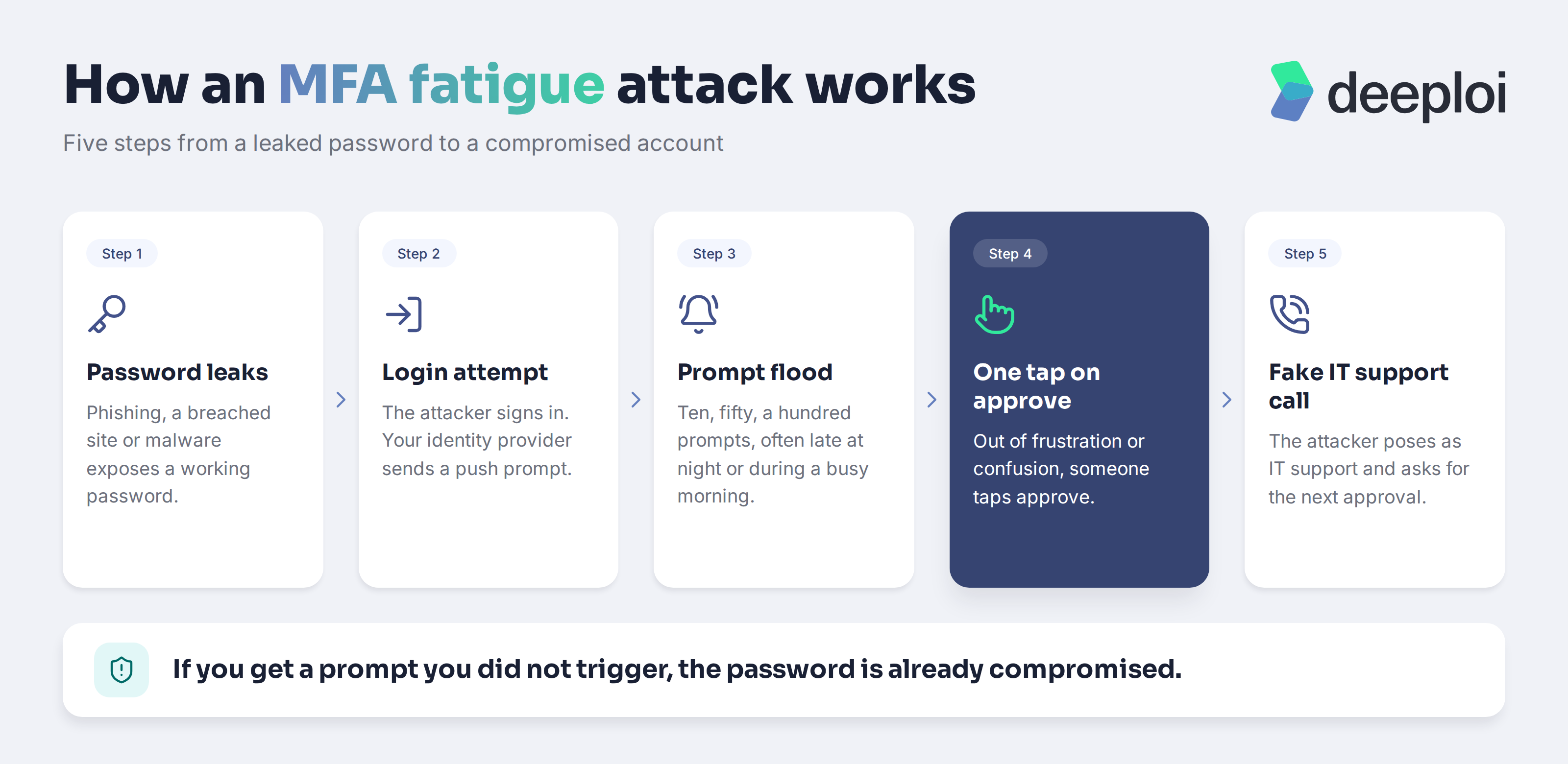
The typical sequence looks like this:
- The password leaks. It comes from a phishing page, a password reused on a breached site, or malware that scraped saved logins from a browser.
- The attacker tries to sign in. Your identity provider does its job and sends a push notification to the employee's phone.
- The attacker keeps trying. Ten prompts, fifty prompts, often late at night or during a busy morning. Each failed attempt generates a new one.
- Someone taps approve. Maybe to stop the noise. Maybe because they assume a work app glitched and is re-authenticating.
- A follow-up call seals it. The attacker messages or phones the employee pretending to be IT support, apologizes for the "system issue," and asks them to approve the next request.
That last step is what turned prompt bombing from a nuisance into a reliable technique. The 2022 breaches at Uber and Cisco both became well-known examples of push spamming combined with someone impersonating internal IT.
Voice-based social engineering is now a serious entry point in its own right. Mandiant found that voice phishing was the initial infection vector in 11% of the incidents it investigated in 2025, ahead of email phishing at 6%, and that organizations spotted malicious activity internally 52% of the time, up from 43% a year earlier (Mandiant). A convincing phone call pairs naturally with a phone that won't stop buzzing.
The approval rate is low per attempt, which is exactly why attackers send so many. Across a dataset of 15,000 enterprise push-based attacks recorded between June 2023 and May 2024, users accepted 5% of the fraudulent pushes (Cisco Duo). One in twenty is plenty when the attack costs nothing to repeat.
The insight your team needs is short: if a prompt arrives that nobody triggered, the password behind it is already compromised. The prompt isn't the problem. It's the alarm.
Why is push-based MFA the weak link?
A simple approve or deny prompt asks for one tap and gives almost no context. There's no friction for the attacker and no information for the person holding the phone.
Compare that with a one-time code from an authenticator app. The user has to open the app, read six digits, and type them into whatever screen they're actually looking at. If no login screen is open, the code has nowhere to go. That small amount of effort breaks the attack, because fatigue only works when the wrong answer is as easy as the right one.
Push notifications became popular precisely because they're frictionless, and they remain a big improvement over passwords alone. The point isn't to abandon them. It's to add just enough context and effort that a reflex tap can't hand over an account. AI-generated lures have made the supporting messages harder to spot too, which is why modern phishing defenses for SMBs now focus on controls rather than on spotting bad grammar.
Why are growing teams without dedicated IT easy targets?
Attackers pick targets by how much process a company has, not by how many employees it has. A 40-person startup running Microsoft 365 holds customer data, payment details, and a mailbox that can authorize invoices. It usually has nobody watching sign-in logs.
Three gaps show up again and again in smaller teams:
- Nobody reviews the logs. Repeated denied MFA attempts from an unfamiliar country sit in the admin console, unread.
- Nobody owns the report. An employee getting odd prompts doesn't know whether to message the founder, the office manager, or a Slack channel, so they tap approve and move on.
- Nobody set the expectation. If security has never been explained, employees treat prompts as a technical annoyance rather than a warning sign.
The behavioral data backs this up. In a survey of 7,500 employees across 15 countries, 71% admitted taking a risky action such as reusing a password or clicking a link from an unknown sender, and 59% were either unsure whether protecting their organization was their job or said it wasn't (Proofpoint).
Training alone rarely closes that gap, and most small companies barely run any. In the UK government's 2025 survey, 15% of micro businesses and 34% of small businesses had provided cyber security training or awareness sessions in the previous 12 months (UK Department for Science, Innovation and Technology and Home Office). If you're weighing where to spend effort, the evidence on security awareness training outcomes is worth reading before you buy another course.
The skills shortage is real as well. A 2026 UK government study found 57% of businesses had a basic cyber security technical skills gap, up from 49% the year before, and 47% of the people responsible for security lacked confidence handling a breach and hadn't outsourced that responsibility to anyone (UK Department for Science, Innovation and Technology).
What stops MFA fatigue attacks before an account is compromised?
Two changes do most of the work: make the prompt impossible to approve blindly, or remove the prompt entirely.
Number matching and extra context in the prompt
Number matching shows a two-digit number on the login screen and asks the user to type it into their authenticator app. A tap no longer works. If the employee isn't looking at a login screen, they have no number to type, and the attack dies there.
Microsoft Authenticator enforces number matching for push notifications, and other major providers offer equivalent options. Turn on the extra context too: showing the application name and the sign-in location inside the prompt lets an employee see "Amsterdam" when they're sitting in Munich.
Be honest about the limit. Someone on the phone pretending to be IT support can still talk a helpful person into reading out the number. Number matching removes accidental approvals, not manipulated ones. If you're starting from scratch, this step-by-step 2FA rollout guide covers the sequencing for a company-wide switch.
Phishing-resistant MFA: passkeys and security keys
Passkeys and FIDO2 hardware security keys are the strongest answer available to a small company. They bind the login to the actual website or app and to the physical device in front of the user. There's no prompt to approve and no code to read aloud, so both fatigue attacks and credential phishing stop working.
This is no longer a niche choice. By May 2024, passkeys had been used more than 1 billion times to authenticate users across more than 400 million Google Accounts (Google). A practical starting point: roll passkeys out first to admins, finance, and leadership, then widen from there.
What else should you have in place beyond stronger MFA?
Conditional access and sign-in policies
Conditional access decides when a login is allowed at all. You can require a managed, compliant device, restrict sign-ins to expected countries, and force a full re-authentication when something looks unusual, such as an impossible travel pattern between two logins.
The effect is that a stolen password stops being enough to even generate a prompt. These rules are the practical core of zero trust security for smaller companies, and most of them already ship with the Microsoft 365 or Google Workspace plan you pay for. Pairing them with centralized authentication and network controls gives you one place to see who's getting in.
Central device management and automated updates
Account security and device security aren't separate projects. Infostealer malware harvests saved passwords from browsers, and those passwords feed the next fatigue attack. Verizon's 2025 breach analysis found that 46% of sampled systems compromised by infostealers holding possible corporate login data were not enterprise-managed devices (Verizon). Unmanaged laptops are where credentials leak.
Central device management closes that loop. Disk encryption with BitLocker or FileVault, automatic security patches, enforced password standards, and the ability to lock or wipe a device remotely all reduce how much damage one compromised account can cause. Someone has to own this. In companies without an IT department, that role falls either to a person who owns IT by accident or to a platform such as deeploi, where device and security policies are applied centrally and the technical evidence stays documented for audits.
Offboarding belongs in the same bucket. Accounts revoked and devices wiped on the leaving date remove the stale credentials attackers love, because nobody notices prompts arriving for a mailbox that no one reads anymore.
How should you respond when someone reports repeated prompts?
Treat a burst of unexpected prompts as a live incident. The password is already out.
- Reset the password immediately from a clean device, using a page the employee opens themselves.
- Revoke all active sessions in the Microsoft 365 or Google Workspace admin console. A password change alone won't kick out an attacker holding a valid session token.
- Check the sign-in logs for successful logins from unfamiliar locations or devices.
- Review registered MFA methods and remove anything the attacker added. This is how they get back in after a reset.
- Check the mailbox for new forwarding rules, inbox rules, and newly authorized third-party apps.
- Write it down. What happened, when, which accounts, what you did.
Speed depends on preparation, and most small companies aren't prepared. In the UK government's 2025/2026 survey, only 21% of micro businesses had a formal incident response plan, compared with 57% of medium-sized businesses (UK Department for Science, Innovation and Technology and Home Office). The same survey found 43% of micro businesses required two-factor authentication, up from 35%, so adoption is moving in the right direction.
A one-page plan with a named contact beats a sophisticated playbook nobody can find. Tell your team where to report, and never make anyone feel foolish for raising a false alarm. Our short guide on handling a suspicious email works well pinned in a Slack channel, and the first 60 minutes after a phishing click follow the same containment order.
Why does this matter for compliance and insurance?
Multi-factor authentication is now a baseline expectation rather than a bonus. NIS2 requirements took effect in Germany in December 2025, ISO 27001 expects documented access controls, and cyber insurance questionnaires ask about authentication before they ask about almost anything else.
The question is getting sharper. "Do you use MFA?" is becoming "which kind of MFA, on which accounts, and can you prove it?" Being able to answer that with number matching or passkeys, backed by an exportable list of enrolled users and managed devices, makes audits and renewals considerably less painful. For broader context, our cybersecurity guide for small businesses maps these obligations to practical controls.
Frequently asked questions
Can MFA fatigue attacks happen with SMS or email codes?
Not in the same way. A code has to be actively read and typed somewhere, so an unexpected text message is far harder to exploit through sheer repetition. That said, SMS isn't a safe alternative: codes can be phished in real time and phone numbers can be hijacked through SIM swapping. Move toward number matching or passkeys instead of falling back on text messages.
Is turning off push notifications enough to prevent these attacks?
It removes this specific vector, but it pushes your team toward weaker methods and more friction. Upgrading the prompt is the better move. Keep push notifications, require number matching, and show the app name and sign-in location so people can judge each request.
Does number matching fully solve the problem?
It eliminates accidental approvals, which is the bulk of the risk. It doesn't stop an attacker who calls an employee, poses as IT support, and talks them into typing the number. Passkeys and hardware security keys remove that weakness because there's nothing a user can read out over the phone.
How do I know if my company has already been targeted?
Open the sign-in logs in Microsoft Entra or the Google Workspace admin console and filter for failed or denied MFA attempts. Repeated denials against one account from an unfamiliar location or IP address are the clearest signal. Ask your team directly too, since many people silently dismiss odd prompts without mentioning them.
What should an employee do with a prompt they didn't trigger?
Deny it, don't open any links in related messages, and report it immediately through whatever channel you've agreed on. Then whoever handles IT should reset the password, revoke active sessions, and review the account's registered MFA methods before anything else.