







Direct Answer
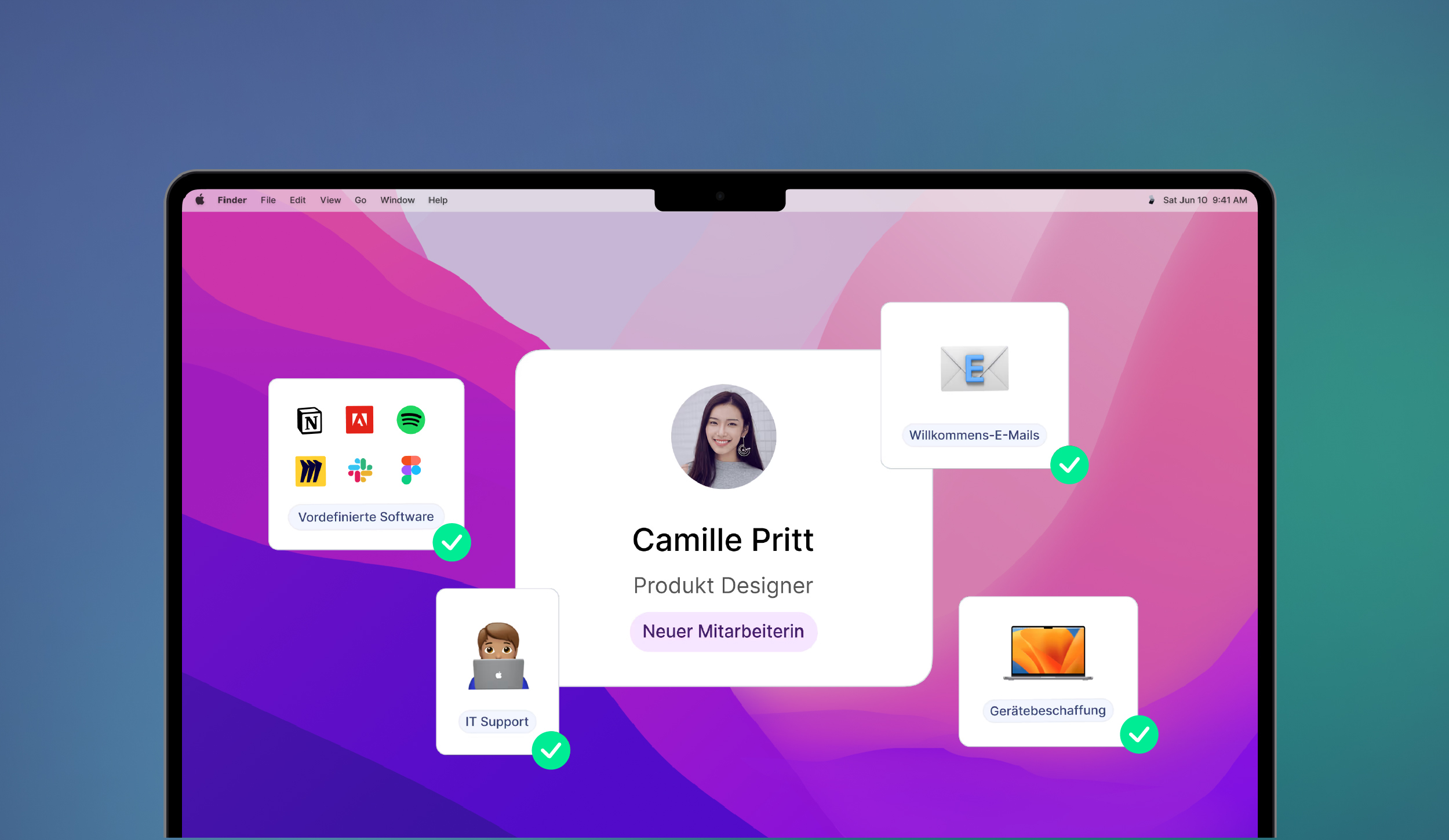
Onboarding software automates the key steps around new employees and makes sure tasks, access and documents are ready in a structured way from the start. While classic HR tools mainly cover administrative processes, deeploi also automates the complete IT onboarding, from hardware and software to workspace setup, and cuts the effort from 2-3 hours to just 3-5 minutes.
Key Takeaways
- 78% of employees say onboarding at their company needs improvement, and the first workday often decides motivation and long-term retention.
- Onboarding software cuts onboarding effort by up to 95%, from 2–3 hours of manual work per new hire to 3–5 minutes with automated workflows.
- The key difference between HR onboarding tools (documents, checklists, training) and IT onboarding platforms is that only the latter also handle hardware provisioning, software installation and workspace setup.
- Most classic HR tools such as Personio, Factorial or Workday don't cover IT onboarding, so the technical setup remains a separate and often manual task.
- deeploi closes this gap as an All-in-One IT Management Platform: the device arrives preconfigured, the account is created and the software is installed, without manual IT effort.
The initial phase of a new employee’s journey often determines whether they stay with the company long-term. But manual onboarding processes cost HR valuable time: sending emails, setting up access, working through checklists. With the right onboarding software, you can automate these HR workflows and ensure that new team members can be productive and successful from day one.
In this comparison, we introduce the 7 best onboarding software tools, from comprehensive HR suites to specialized onboarding platforms. Learn which solution best fits your company and how you can complete onboarding in just 5 minutes.
Note: This article provides an overview of different onboarding tools. The order does not imply a ranking.
What is onboarding software and how do you use it in your company?
Onboarding software digitizes and accelerates the entire onboarding process for new employees. Instead of manual checklists, Excel sheets, and long email chains, the software centrally coordinates all onboarding processes: from hardware and software access to distributing documents and introducing the employee to the team.
How it works in a company: After the contract is signed, the onboarding software automatically triggers predefined onboarding workflows. HR receives an overview of all upcoming tasks, IT is notified about hardware orders, and new employees gain access to important information and training materials even before their first workday. The software automatically creates accounts and sends welcome emails.
A key benefit: modern onboarding platforms sync with existing HR systems like Personio, creating a seamless transition from recruiting to onboarding. For companies with stronger IT needs, specialized IT onboarding software like deeploi additionally handles the entire technical setup – from hardware procurement to automatic software installation to workspace configuration. This reduces the onboarding process from several hours to just 3–5 minutes.
The advantages of onboarding software
Modern onboarding software eliminates errors and transforms the onboarding of new employees from a time-consuming, manual process into an efficient, automated workflow. The advantages go far beyond time savings – they create the foundation for successful, scalable HR processes.
Time savings and efficiency gains for HR and IT
Manual onboarding costs an average of 2–3 hours per new employee – time HR teams lack for strategic tasks. Onboarding software reduces this workload to just minutes thanks to automated workflows, predefined checklists, and self-service portals. Instead of coordinating each task individually, the process runs in the background.
With deeploi, for example, the entire IT onboarding takes just 3-5 minutes: device ordering and tracking are integrated into the platform, so managing multiple vendors is no longer necessary. Predefined software packages for your teams are installed on their devices from day one. Workspace accounts are created without manual intervention.
deeploi also automates offboarding in 3–5 minutes: SaaS accounts are deactivated centrally, workspace licenses are downgraded, email forwarding is set up, data is transferred to the person taking over, and the device is prepared for return. Data is only deleted if you explicitly decide so.
Consistent and error-free onboarding
With manual onboarding, steps are often forgotten or errors occur: missing access, unsigned documents, delayed hardware delivery. An onboarding platform ensures every employee follows the same structured onboarding process. Automatic reminders and status updates prevent tasks from being overlooked. The software documents every step and provides transparency – for both HR teams and new employees.
Better onboarding experience from day one
New hires who spend their first workday waiting for access or an unconfigured laptop start their job frustrated. In the Haufe onboarding study, 78% of respondents said onboarding in their company needed improvement.
With the right tool, all technical requirements are in place so they can focus on their role. This boosts motivation and productivity from the start. IT onboarding solutions like deeploi ensure that laptops, software, and workspace access are fully configured when the employee begins.
Scalability for growing companies
While small companies may still handle onboarding manually, it quickly becomes chaotic as the business grows. Onboarding software scales effortlessly: whether 5 or 50 new employees per month, workflows remain structured and efficient. Automated processes adapt flexibly to different roles, departments, and locations without HR having to reconfigure each workflow.
These key features matter when choosing onboarding software
Choosing the right onboarding software determines whether your processes truly become more efficient or merely digital versions of manual workflows. Pay attention to these essential features to get the most out of your onboarding platform.
Automated workflows and task distribution
Your onboarding tool should create role-based onboarding workflows that automatically assign tasks to HR, IT, and new employees. Important: flexible customization of workflows by department, location, or role. High-quality onboarding tools also assign the right software packages to team members – after all, marketing managers need different tools than graphic designers.
Integration with existing HR systems
A seamless connection to HR systems like Personio prevents duplicate data entry. Onboarding software should automatically import employee data and start the onboarding process right after contract signing. This synchronization is essential: as soon as a contract is signed, all onboarding workflows should run automatically – from hardware ordering to account creation.
IT onboarding and hardware provisioning
A critical question: can the software also manage IT onboarding? This includes automatic device ordering, software installation, workspace setup (Google Workspace, Microsoft 365), and access management. Pure HR onboarding software often doesn’t cover this area. Here lies the key difference: while traditional tools only manage administrative tasks, specialized IT onboarding solutions like deeploi handle the entire technical setup. This means: you get real-time visibility of all devices and accessories – without manual maintenance. Software packages are installed automatically, and users for workspace accounts are created without manual work.
Self-service portal for new employees
New team members should be able to access documents independently, fill out forms, and track their onboarding progress. This reduces questions for HR, simplifies communication, and speeds up the entire process. An intuitive self-service portal allows new employees to receive important information before their first week, complete trainings, and track the status of their hardware order. This helps them begin their onboarding well-prepared and with confidence.
Reporting and progress tracking
Transparency is essential: HR teams need real-time visibility into the status of all onboarding workflows, outstanding tasks, and potential bottlenecks. Good onboarding tools provide dashboards and reporting features that help optimize the process. These functions make it easier to identify weak points, measure cycle times, and document the ROI of onboarding automation. Only with meaningful data can the onboarding process be continuously improved.
In a free demo, you can learn how to get new employees up and running with deeploi in just 5 minutes.
The 7 best onboarding software tools at a glance
Below we present seven leading onboarding solutions – from comprehensive HR suites to specialized tools. Each software has strengths depending on whether you need HR onboarding, IT onboarding, or both.
deeploi – All-in-One IT onboarding in 3–5 minutes
deeploi is an IT management platform that automates the entire technical onboarding process. While other tools focus on documents and checklists, deeploi handles full IT provisioning: hardware ordering, automatic software installation, account creation, workspace setup, and security configuration. Devices are ready to use from the moment they are first turned on.
Key features:
- Full HR integration (e.g., Personio, BambooHR) for automatic onboarding triggers
- Predefined software packages assigned automatically by team or role
- Hardware procurement with a few clicks or use of existing inventory
- Unlimited IT support with response times under 12 minutes (SLA: 30 minutes)
- The first point of contact in support is Sam, deeploi's AI agent. Sam is available around the clock, answers instantly and resolves many requests directly, such as adjusting group memberships or mailbox access. Sam follows the same approval process as the human team, and when a request needs a person, Sam hands it over to the IT experts with everything learned so far.
- Comprehensive security features such as automated password policies, security updates, and remote device locking

Pricing: deeploi charges a fixed monthly price per active team member, with no setup fee, no hidden per-ticket costs and unlimited support requests. Optional add-ons for extended protection and cloud backup are available.
Data protection: deeploi is an EU-hosted, ISO 27001-certified and GDPR-compliant platform, so your company data stays within EU jurisdiction. Our guide to EU data residency and GDPR for SMBs shows how to check the data residency of your entire tool stack.
Ideal for: Companies that want to automate IT onboarding and fully equip new employees from day one. Particularly valuable for fast-growing startups, agencies, consultancies, and remote teams scaling without time-consuming IT coordination.
Time savings: From 2-3 hours to 3-5 minutes per onboarding. This drastic reduction allows HR teams to focus on strategic tasks, while new employees can be productive from their very first day.
deeploi is also often used by companies that have their own IT team but want to take routine work off its plate, so internal capacity is freed up for complex IT projects. You still don't need an IT department or technical expertise: deeploi is explicitly designed for HR teams that handle IT onboarding without dedicated IT professionals. All technical steps run automatically in the background, and personal IT support answers your team's technical questions.
Personio – HR suite with integrated onboarding
Personio is a comprehensive HR software platform combining recruiting, onboarding, time tracking, and HR management. Its onboarding module provides automated workflows, document management, and task tracking for administrative HR processes.
Key features:
- Seamless transition from recruiting to onboarding
- Automated task distribution with individualized to-do lists
- Self-service portal for document submission
- Electronic signatures for contracts and forms
- Standardized onboarding templates by department or role
- Well suited as an all-in-one HR solution
Pricing: Personio starts at €7.60 per employee per month; add-on apps such as Payroll or Recruiting determine the final price.
Data protection: Personio is ISO 27001-certified, and compliance is audited annually by an independent external auditor. The platform meets the key requirements of the EU GDPR and encrypts data both in transit and at rest.
In this case not ideal: Personio focuses on administrative HR processes, while IT onboarding must be organized separately. Hardware provisioning, software installation, and workspace setup are not included.
However, Personio customers can connect their account via an integration with deeploi. As soon as new employees are added in Personio, the onboarding process is triggered in deeploi. All relevant steps are initiated, and the data from the Personio employee profile can be used, for example, for device shipping. This way you benefit from Personio’s HR features while also leveraging deeploi’s onboarding capabilities.
HR WORKS – Modular HR platform with onboarding functionality
HR WORKS offers a modular HR software platform focused on time tracking, absence management, and employee administration. The onboarding module extends the platform with digital checklists and task management.
Key features:
- Digital onboarding checklists with automatic task distribution
- Integration of document uploads and electronic signatures
- Flexible customization to individual company requirements
- Seamless connection to payroll systems
- Management of working hours and leave requests during onboarding
Pricing: HR WORKS charges per user (minimum 20 users) with no minimum contract term; prices are provided as an individual quote.
In this case not ideal: Onboarding is more of an add-on than a core function. IT onboarding is not covered. For companies with complex technical requirements or a desire for comprehensive onboarding automation, the functionality may be too limited.
elearnio – E-learning–focused onboarding
elearnio is a learning platform that supports onboarding through digital trainings and courses. New employees complete structured learning paths with videos, quizzes, and certificates.
Key features:
- Personalized learning paths with interactive modules
- Focus on knowledge transfer and training
- Gamification elements and quizzes for knowledge assessment
- Automatic certificate generation after course completion
- Integration with existing HR systems
Pricing: elearnio's Essential plan costs €250 per month for up to 50 licenses; from 51 licenses, pricing is provided as an individual quote.
In this case not ideal: elearnio focuses exclusively on the learning component of onboarding. Administrative tasks such as contract signing are not supported. Hardware and software must be organized separately. The platform is better suited for industries with extensive training requirements rather than holistic employee onboarding.
Factorial – Simple HR software for small teams
Factorial targets small and medium-sized businesses and offers a user-friendly HR platform with onboarding features and document management for basic HR processes.
Key features:
- Automated onboarding flows with templates and digital signatures
- Employee portal with self-service functions
- Simple document management and contract signing
- Integration with Google Workspace, Slack, and other tools
- Absence and time tracking
Pricing: Factorial starts at €8 per user per month; the individual plan is put together on request.
In this case not ideal: The feature set for onboarding is limited and does not include IT onboarding. As requirements grow or processes become more complex, the solution reaches its limits quickly. It is primarily suited for small companies with simple, standardized onboarding processes and low technical needs.
Workday – Enterprise solution for large organisations
Workday is a comprehensive cloud HR platform for large enterprises with complex organizational structures. Workday Journeys offers highly customizable onboarding workflows for different roles and locations.
Key features:
- Personalized onboarding journeys for each employee role
- Scalable for thousands of employees worldwide
- Comprehensive reporting and analytics dashboard
- Automatic push notifications and reminders
- Integration with global talent management and payroll
Pricing: Workday does not publish a public price list; prices are quoted individually on request.
In this case not ideal: Overdimensioned for SMEs, with high costs and long implementation times. The complexity of the platform requires dedicated HR teams and extensive training. IT onboarding, including hardware provisioning and software installation, must still be handled separately despite the extensive functionality. For companies with fewer than 1,000 employees, the investment is usually not justified.
reteach – Onboarding through digital training
reteach is an e-learning platform focused on easy creation of training content for onboarding and employee development. Particularly suitable for knowledge-intensive onboarding processes.
Key features:
- Fast creation of learning content
- Automatic course assignment
- Certificates and progress tracking
Pricing: reteach offers package prices starting at €150 per month; the price depends on the package and the number of participants.
In this case not ideal: The platform exclusively focuses on knowledge transfer and does not cover administrative or technical onboarding tasks. It cannot coordinate task distribution outside of training content and is therefore not suited as a comprehensive onboarding solution.
IT+HR platforms compared to onboarding specialists
Which platform really combines HR and IT onboarding? Besides the classic HR suites, you will come across a second group of vendors when searching for onboarding software: platforms that combine HR administration and IT in one system. These include Rippling, Deel and JumpCloud. They are not among the seven solutions above, but they help put the market in context.
Rippling positions itself as a platform for HR, IT and spend management and bundles payroll, benefits and device management in one system. While Rippling covers many areas of workforce management, pricing is only available as an individual quote, and there is no public price list.
Deel is a global HR platform for international teams. Its Deel IT module manages devices, app access and IT support with automatically enforced policies, from onboarding to offboarding, in more than 130 countries. Deel HR Core officially costs USD 5 per person per month, and Deel IT pricing is available on request.
JumpCloud comes from the IT side. The cloud directory platform combines identity, device and access management, such as single sign-on (one central login for all applications), multi-factor authentication and mobile device management (central management of all devices), and it is aimed at IT teams rather than HR. Device management starts at USD 9 per user per month, billed annually.
Where deeploi fits in: Rippling and Deel are HR suites with added IT features, and JumpCloud provides pure IT infrastructure. deeploi is an IT onboarding specialist that integrates natively with existing HRIS systems such as Personio, Factorial HR and BambooHR. The HR suite handles contracts, documents and administrative workflows, while deeploi handles the complete technical onboarding, from hardware and software to the workspace. Together they cover HR and IT onboarding completely, including personal IT support with an average response time of 12 minutes (SLA: 30 minutes). If you want HR and IT in a single platform, look at the IT+HR platforms. If you want to keep your existing HR suite and automate IT onboarding, combine it with deeploi.
How automated IT onboarding works
What does automated IT onboarding mean in practice? deeploi's process shows how device provisioning (providing and configuring devices) and access provisioning (setting up access automatically) work together:
- Trigger in the HR system: As soon as a new employee is added to the HRIS (Personio, Factorial, etc.), the workflow starts automatically. Nobody has to write a ticket to IT.
- Device provisioning: The device is procured, loaded with the software packages for the role and shipped directly to the new employee's address.
- Zero-touch setup: When it is switched on for the first time, the device sets itself up via zero-touch provisioning and loads all settings, apps and security policies automatically, without manual configuration by IT.
- Access and security policies: Workspace accounts (Google Workspace, Microsoft 365) and app access are provisioned automatically. Password policies and security updates apply from the first login.
The result: instead of 2–3 hours of manual configuration per employee, the effort drops to 3–5 minutes.
Remote onboarding without an office
Does onboarding also work fully remote, without an office? Yes, and for distributed teams it is the norm. The laptop is shipped preconfigured directly to the new employee's home address. With zero-touch setup, the device configures itself when it is first switched on, and workspace and app access are provisioned remotely. No office visit is needed before the first workday, so new employees can start from anywhere. Our article on remote onboarding for new employees walks through the full process, from shipping the device to the first workday.
Conclusion: How onboarding software enables onboarding in 3–5 minutes
Onboarding software is no longer a nice-to-have – it is a crucial factor for efficient HR processes and successful employee onboarding. The right solution not only saves time and costs but also ensures that new employees can start their work productively and motivated right after they’re hired, without unnecessary paperwork.
The key insight: while traditional HR onboarding software covers administrative processes, IT onboarding often remains a separate challenge. deeploi takes on exactly this task: as an All-in-One IT Management Platform, deeploi automates the entire technical onboarding process – from hardware provisioning to software installation to workspace setup and configuration.
The reality in most companies looks like this: HR manages documents and checklists digitally, but new employees still wait days or weeks for their laptop, the correct software access, or functioning email accounts. Often, programs must be downloaded, installed, and set up manually. This gap between HR onboarding and IT provisioning costs productivity and frustrates new employees from their very first days.
Why deeploi is the best choice for modern onboarding:
- 3-5 minutes instead of 2-3 hours thanks to automated IT onboarding that reduces IT workload by 95%
- Seamless HR integration that syncs with Personio and other HR systems
- Complete IT provisioning from hardware to software to workspace access
- Unlimited IT support without waiting times
- Scalable for 5 or 500 new employees per month without additional HR effort
Who is deeploi ideal for? Companies that no longer want to experience IT onboarding as a time-consuming problem but as an automated and well-organized process. Especially valuable for fast-growing startups, remote teams, and companies without dedicated IT departments. But established companies also benefit from significant time savings and can free up HR for strategic tasks.
Ready for effortless IT onboarding? Book a demo now and experience how deeploi transforms your onboarding process.
FAQ – Frequently asked questions about onboarding software
What is onboarding software?
Onboarding software digitizes and automates the onboarding process for new team members, ensuring a positive first impression. It coordinates all steps of the onboarding program: document management, task tracking, hardware provisioning, and software access. Modern onboarding platforms like deeploi integrate with HR systems and ensure that new employees are fully equipped and ready to start from day one.
How much time do I save with deeploi?
With deeploi, you reduce IT onboarding effort from an average of 2–3 hours to just 3-5 minutes per new employee – equivalent to more than 95% time savings. Automation handles hardware ordering, software installation, account creation, sending welcome emails, and device setup so HR and IT can focus on strategic tasks.
Does deeploi help with onboarding remote employees?
Yes, deeploi is ideal for remote onboarding. Hardware is shipped directly to the new employee’s home, fully set up and ready to use. Smart device configuration allows remote employees to access all necessary tools immediately, with ongoing automatic updates. This enables your remote team to start productively without needing on-site IT support. Devices can be shipped directly without intermediate handling, creating no extra workload for HR.
Why should companies use onboarding software?
Onboarding software eliminates manual, error-prone processes and ensures consistent onboarding. It saves time, reduces costs, and improves the employee experience. New employees start motivated and productive because everything is ready for them on their first day. For growing companies, onboarding software is essential to establish scalable processes.
Can onboarding software also be used for offboarding?
Yes, many onboarding platforms also offer offboarding features. deeploi, for example, also automates offboarding in 3–5 minutes: SaaS accounts are deactivated centrally, workspace licenses are downgraded, email forwarding is set up, data is transferred to the person taking over, and the device is prepared for return. Data is only deleted if you explicitly decide so. This ensures no security gaps appear when employees leave, and the process runs just as smoothly as onboarding. You also receive a notification if a required step has not yet been completed.
Is onboarding software useful for small companies?
Absolutely. Small companies and SMEs benefit greatly because they often lack dedicated IT departments or large HR teams. Onboarding tools automate tasks that would otherwise need to be completed manually, saving valuable time. Solutions like deeploi are designed specifically for SMEs and scale as the company grows. Even with only a few new employees per year, the investment pays off through time savings and improved access to information and necessary resources. This ensures every new hire becomes a success from the start.
Does onboarding also work fully remote, without an office?
Yes. The laptop is shipped preconfigured directly to the new employee's home address, the device sets itself up via zero-touch setup when it is first switched on, and workspace and app access are provisioned remotely. No office visit is needed before the first workday.
Still have questions about deeploi and IT onboarding? Our team is happy to advise you personally and show you how you can complete your onboarding processes in just 5 minutes.



